RTW RESTON TECHWIZ
// post

[EP04] Vibe Coding for Internal Tools: The Opportunity Hiding Behind Spreadsheets

The best internal tools often do not start as product ideas.

They start as a spreadsheet.

Usually something with a name like Ops Tracker FINAL v4.xlsx, living in a shared drive, quietly carrying more responsibility than anyone admitted in the job description. It began as a temporary fix. Then someone added a second tab. Then Finance needed a copy. Then Sales started depending on it. Then Operations stopped asking, “Where is that job?” and started asking, “Did you update the sheet?”

At that point, the spreadsheet stopped being a file.

It became a business process with gridlines.

This is where vibe coding gets interesting for internal work. Not because every spreadsheet deserves to be replaced by a shiny app. Not because AI-generated screens should suddenly run payroll, pricing, approvals, inventory, customer data, and everyone’s blood pressure.

The useful part is more specific.

A rough internal tool can make a hidden workflow visible. It can show where the process already exists, where it depends on one person’s memory, where status gets lost, where data is copied too many times, and where the business has been asking a spreadsheet to behave like software.

The spreadsheet is not the enemy. It is the receipt.

internal tools rule – rtw 2026
// signal

The file is doing work

A spreadsheet that coordinates quotes, jobs, approvals, or reports has crossed from analysis into operations.
// hidden risk

The rules live in people

When column meanings, approval paths, or formulas depend on one person, the business has a workflow dependency it may not have named yet.
// build path

Prototype the workflow first

The first tool should expose states, owners, exceptions, source of truth, and handoffs before anyone treats it as production software.

// the quiet system The Spreadsheet Was Supposed to Be Temporary

Nobody wakes up and says, “Let’s build an unofficial operational system in Excel and make sure only one person understands the formulas.”

That would be alarming. Also, honest.

What usually happens is much more reasonable.

A team needs to track quotes before the CRM is ready. A coordinator needs to know which jobs are scheduled this week. A manager needs a quick approval list. Finance needs a Friday report. HR needs to see who has completed onboarding paperwork. Someone builds a spreadsheet because the spreadsheet is available, flexible, familiar, and does not require a procurement conversation.

That is a perfectly normal starting point.

The problem begins when the temporary fix becomes permanent infrastructure.

A spreadsheet is wonderful when one person is analyzing something, comparing options, cleaning a list, modeling a scenario, or doing work that is narrow, temporary, and low-risk.

It gets more fragile when it becomes the place where the business decides what should happen next.

WHEN A SPREADSHEET CHANGES JOBS // FIG. 02 – spreadsheet maturity ladder
Stage What it looks like What it really means
Personal scratchpad One person uses it to think. Fine. Leave it alone. Let the spreadsheet have hobbies.
Shared tracker A few people update the same sheet. The team has a repeated process.
Team workflow Status, owners, dates, and comments appear. The spreadsheet is coordinating work.
Operational dependency People check it before acting. The spreadsheet is now part of the business system.
Risky source of truth Nobody knows what happens if it breaks. It may need governance, integration, or a real internal tool.

That last jump is the one leaders should notice.

Not because spreadsheets are bad. They are not. Spreadsheets are one of the most useful business tools ever created. They are also very good at accepting responsibility without complaining.

A spreadsheet will let you add customer data, pricing rules, manual approvals, vendor notes, conditional formatting, five hidden tabs, and a formula from 2019 written by someone who now lives in Denver and no longer replies to Teams messages.

It will not ask, “Should we maybe discuss access control?”

That part is still on us.

// evidence Shadow IT Is Not a Scandal. It Is a Symptom.

There is a reason these internal workarounds appear.

Business teams often understand the problem long before the official systems catch up. The people doing the work know where the bottleneck is, which field matters, which customer status causes confusion, and which approval step exists only because someone once got burned in 2021 and nobody wants a sequel.

McKinsey describes this “shadow side” of technology clearly: business understanding often gets translated into digital solutions on low-code or no-code platforms such as Excel, but without IT governance or a structured development process. McKinsey also warns that shadow applications can create hidden dependencies, or “phantom couplings,” when they rely on data from official systems without technology teams knowing about the dependency. McKinsey

That phrase deserves a tiny spotlight.

Phantom coupling is exactly what happens when the spreadsheet looks harmless until someone changes a field name in the CRM and the Friday report quietly turns into modern art.

MIT Sloan points to the same broader movement from a different angle. Citizen developers and citizen automators are growing because functional experts in finance, HR, operations, and other teams can now build apps, automations, and data workflows without traditional programming skills. MIT Sloan’s caution is important too: grassroots development works best when business expertise is paired with IT, risk, and compliance involvement, not when everyone runs into the woods with a license for software and a dream. MIT Sloan

KPMG frames the risk through end-user computing, or EUC: applications owned or operated outside IT governance. Their EUC guidance notes that these tools often complement core business systems, but may lack fundamental data and processing integrity controls. It also calls out Excel spreadsheets as a typical use case when existing tools cannot satisfy business requirements. KPMG

None of this means the person who built the spreadsheet did something wrong.

Usually, they did something useful.

The spreadsheet is often proof that the business had a need before it had a system. It is a prototype that accidentally became essential.

The question is not, “Who allowed this?”

The better question is, “What has this spreadsheet taught us about the real workflow?”

// not a dashboard repeat This Is Not Another Dashboard Conversation

A lot of internal-tool conversations get pulled toward dashboards.

That makes sense. Dashboards are visible. They are easy to imagine. They look good in a meeting. A dashboard says, “Here is the business.” Very tidy. Very executive. Very likely to include a donut chart that nobody asked for but everyone tolerates.

But the spreadsheet problem is often not a dashboard problem.

It is a workflow problem.

A dashboard tells people what happened or what needs attention. A workflow tool helps the team move something from one state to another with fewer dropped balls, fewer private notes, fewer duplicate updates, and fewer moments where someone asks, “Wait, whose job was that?”

That difference matters.

A spreadsheet that tracks quotes is not asking to become a prettier chart. It may be asking for status ownership, CRM sync, revision history, reminders, and a cleaner handoff between sales and finance.

A spreadsheet that tracks jobs is not asking for a revenue graph. It may be asking for a queue, an exception list, crew availability, customer readiness, and one honest meaning for the word “blocked.”

A spreadsheet that produces a weekly report is not asking for a dashboard just because it has numbers. It may be asking for import validation, change control, review steps, and a better way to know which numbers are final.

When one person knows why column H matters, you do not have a system. You have a hostage situation with formulas.

workflow diagnosis – rtw 2026

// decision lens When a Spreadsheet Is a Candidate for an Internal Tool

Not every spreadsheet should become software.

Some spreadsheets should remain spreadsheets. They are happy there. They have snacks.

The candidates worth exploring usually share a few traits.

INTERNAL TOOL SIGNAL TABLE // internal tool signal table
Signal What it may mean
The process repeats every week or every day. It is operational, not occasional.
Multiple people update the same file. Coordination matters.
Status drives the next action. The sheet is managing workflow, not just information.
One person understands the logic. The business has a key-person dependency.
Data gets copied from another system. Integration or import rules may matter.
Mistakes create real cost. Controls, validation, and review steps may be needed.
People ask, “Which version is final?” Source of truth is unclear.
Someone manually sends reminders. The workflow has timing rules.
The sheet contains customer, employee, pricing, or financial data. Access and auditability matter.
The business would be disrupted if it disappeared. It is already infrastructure.

A good candidate is not simply a spreadsheet people dislike.

A good candidate is a repeated process with owners, statuses, exceptions, and consequences.

That is why vibe coding can help. A quick internal screen can show the process in a more structured way before the team commits to building the real thing. It lets people react to the shape of the workflow, not just the cells where the workflow has been hiding.

The prototype is not the replacement.

It is the x-ray.

what the prototype should make visible

spreadsheet -> workflow scope
  1. States. What can this item be: draft, sent, blocked, approved, final?
  2. Owners. Who is responsible for the next action at each stage?
  3. Exceptions. Why does work stop, and who unblocks it?
  4. Source of truth. Which system owns the customer, job, quote, or financial data?
  5. Controls. What needs permissions, audit history, review, or rollback?

// example 01 The Quote Follow-Up Sheet

Picture a sales team using a spreadsheet to track quotes.

At first, this was fine. A lead came in. A quote was sent. Someone typed the date. Someone highlighted the row yellow. Yellow meant “follow up soon,” except on one tab where yellow meant “waiting on client,” because history is cruel.

Now the sheet has become important.

It includes customer names, quote amounts, expiration dates, service categories, sales reps, notes, discounts, financing flags, and a column called Next Step that currently contains seventeen different writing styles and one passive-aggressive question mark.

A vibe-coded internal screen can make the process visible quickly.

Not production-ready. Not connected to every system. Not trusted with live pricing rules yet.

Just visible.

A ROUGH QUOTE-TRACKING PROTOTYPE MIGHT SHOW: // quote prototype view
Status Business question it reveals
Draft Who can create or edit a quote?
Sent Where does the sent date come from?
Viewed Does the system know this, or is someone guessing?
Needs revision Who owns the revision and how is the old version preserved?
Waiting on finance approval What requires approval and what is automatically allowed?
Expiring soon When should a reminder be sent, and to whom?
Won / lost Does this sync back to CRM, accounting, or reporting?

Now the team can see the real project.

It is not “make the spreadsheet prettier.”

It is source of truth, permissions, reminders, revision history, CRM connection, approval rules, and follow-up ownership.

That is a much better conversation.

Because the pain was never really the grid. The pain was that the quote had no reliable place to live between “sent” and “decided.”

The spreadsheet was doing its best. It was wearing too many hats, but so are most people in a growing business.

// example 02 The Job Scheduling Sheet

Operations spreadsheets have a special kind of suspense.

They contain enough color coding to suggest a system, but not always enough clarity to prevent six people from interpreting the system differently.

A job scheduling sheet may include job date, customer, crew, service area, materials, readiness, access notes, payment status, customer confirmation, internal comments, and a column called Blocked.

The word “blocked” is where the ghosts live.

Blocked because the customer has not confirmed?

Blocked because parts are missing?

Blocked because the crew is unavailable?

Blocked because someone needs a permit?

Blocked because nobody knows, but the row looked lonely?

A rough internal tool prototype can separate those meanings.

INSTEAD OF ONE “BLOCKED” COLUMN, THE PROTOTYPE MIGHT SHOW: // operations prototype view
Exception Owner Next action
Missing customer info Customer support Call or send intake form.
Crew not assigned Operations manager Assign crew or move date.
Material not ready Procurement Confirm purchase order or vendor ETA.
Payment issue Finance Verify deposit or billing hold.
Customer not confirmed Scheduling Send reminder and escalate after 24 hours.

This is where the prototype becomes useful.

It does not just show jobs. It shows why jobs stop moving.

And that is usually where the money is hiding.

A job that sits for three days because nobody owns the next step is not a “visibility issue.” It is a workflow design issue. The spreadsheet may show the row. It may not create accountability.

A proper internal tool may not need to be large. It might start as a job queue with statuses, owners, due dates, and exception categories. It might send reminders. It might sync a few fields from the CRM or booking system. It might help staff update customers at the right moment.

Or the prototype may reveal that a new tool is not the first move at all.

Maybe the real fix is a smaller set of job statuses, clearer ownership, and an automated customer update before anyone builds anything larger.

That is still progress.

A prototype that tells you not to build yet has done a public service.

// example 03 The Friday Finance Report

Every company has some version of the Friday report.

It might not be Friday. It might not be Finance. But there is usually a recurring report that gets assembled from exports, copied into a spreadsheet, adjusted by someone who knows the rules, checked against a number from another system, and sent to leadership with the confidence of a person who has not been interrupted for seventeen minutes.

This report may be harmless.

Or it may be a quiet risk.

Deloitte’s spreadsheet-control guidance recommends maintaining an inventory of in-use spreadsheets, classifying them by risk and complexity, and defining proportionate controls around development, documentation, testing, maintenance, and assurance. Deloitte

That may sound like enterprise governance language, because it is.

But the practical version is simple: know which spreadsheets matter, who owns them, what they influence, and what happens if they are wrong.

A vibe-coded prototype for a recurring report might show a different shape:

That is not just automation.

It is a control path.

The business may still keep some manual review. In fact, it probably should. Not every human step is waste. Some human steps are judgment, compliance, or sanity checking wearing a cardigan.

The point is to separate the work that should be automatic from the work that should remain deliberate.

A prototype can help make that distinction visible.

It can show that the risky part is not the chart at the end. The risky part is the copy-paste before the chart, the manual adjustment nobody logs, the formula nobody tests, or the source export that changed format last month and decided not to announce itself.

The internet has a long spreadsheet blooper reel for a reason. The Guardian’s roundup includes cases where spreadsheet mistakes were linked to nearly 16,000 COVID cases going unreported in England, more than $1 billion in Fannie Mae accounting errors, and risk-model issues connected to JPMorgan’s “London Whale” trading loss. The Guardian

Most internal spreadsheets will never create that level of drama.

Thankfully.

But the pattern is still relevant: when spreadsheets carry operational or financial decisions, small errors can become very expensive adults.

VC-internal-tools-spreadsheets
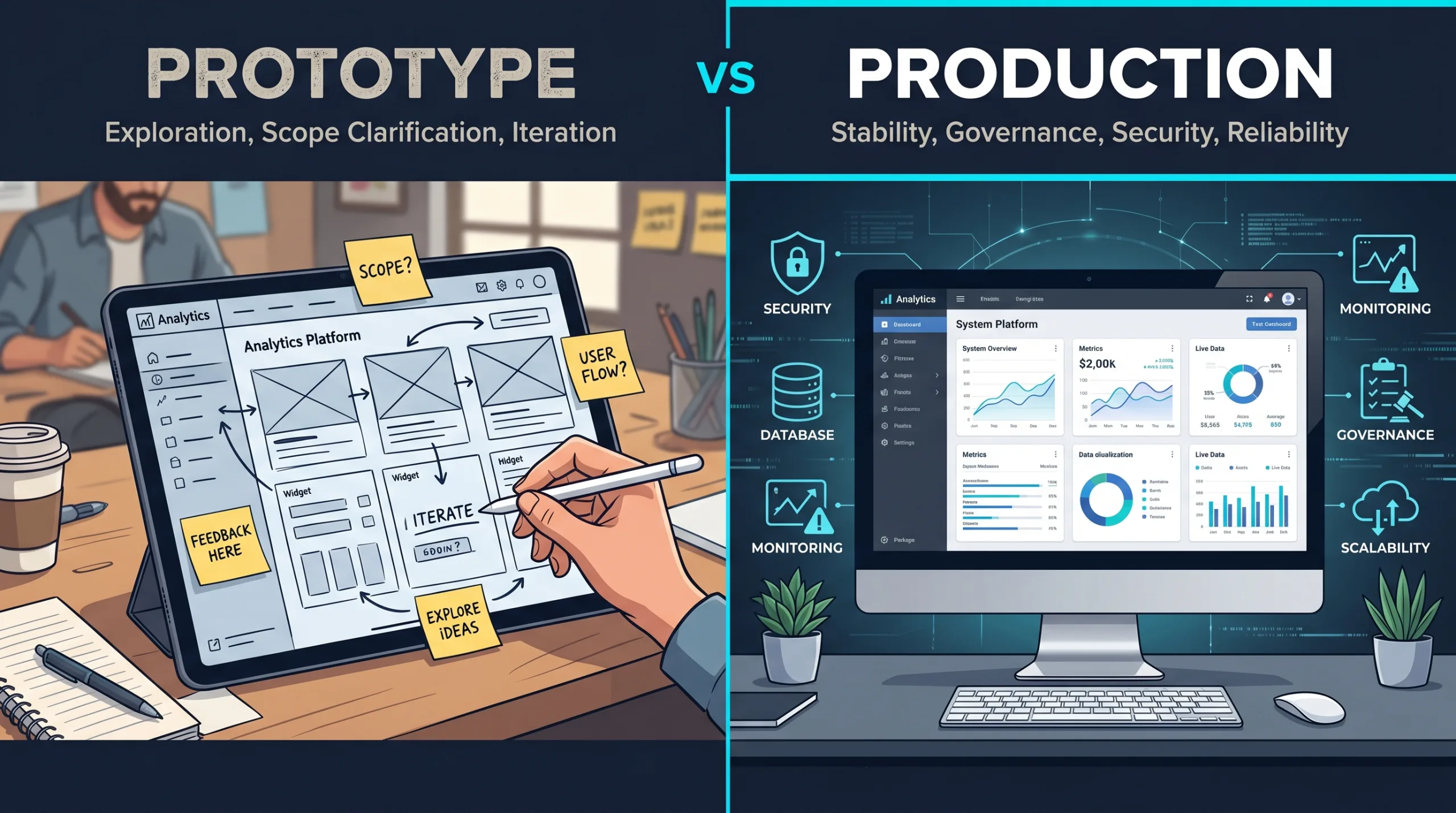
prototype / production line

The rough screen should reveal the real rules.

// what vibe coding adds The Prototype Should Reveal Rules, Not Just Screens

A weak internal-tool prototype says, “Look, we made an app version of the sheet.”

That can be cute.

A strong prototype says, “Here are the states, owners, rules, exceptions, and handoffs that the sheet has been hiding.”

That is more useful.

The first draft does not need perfect styling. It does not need live integrations. It does not need the final database schema, permission model, or notification system.

It does need to expose the right questions.

HIDDEN WORK CHECKLIST // hidden work checklist
Hidden work Question the prototype should force
Status rules What states can this item be in, and who can change them?
Ownership Who is responsible for the next action at each stage?
Source of truth Which system is authoritative for customer, job, quote, or financial data?
Permissions Who can view, edit, approve, export, or delete information?
Exceptions What happens when the normal path fails?
Notifications Who needs to know, when, and through which channel?
Audit trail What changes need to be recorded?
Reporting Which metrics come from the workflow itself, not from manual cleanup later?
Integrations What must connect to CRM, accounting, email, booking, inventory, or file storage?
Support Who maintains the tool after the exciting prototype moment is over?

This is why internal tools are such a good fit for early AI-assisted prototyping.

The rough version can be fake enough to be safe but real enough to argue with.

Sales can say, “That is not how approval works.”

Operations can say, “We need a separate reason for blocked jobs.”

Finance can say, “Please do not let anyone edit that number without logging it.”

Leadership can say, “Now I understand why the weekly report takes half a day.”

Good. Now we are no longer debating an abstract process. We are looking at the thing.

And the thing is finally being honest back.

// internal does not mean harmless Internal Tools Still Touch Real Risk

There is a common temptation with internal tools:

“It is only for staff.”

That sentence has sent many projects into the bushes.

Internal does not mean low-risk. Internal tools often touch the most sensitive parts of the business: customer records, pricing, employee information, vendor documents, financial exports, operational decisions, approvals, and notes that were absolutely not written with future discovery in mind.

So the vibe-coded version should be treated as exploration until it has been reviewed properly.

Before an internal prototype becomes a real tool, it needs answers to boring questions like:

I know. This is less glamorous than “we built an internal app in an afternoon.”

It is also the part that keeps the afternoon from becoming a multi-month cleanup project with calendar invites named “alignment.”

McKinsey’s point about shadow applications creating risk is relevant here: the danger is not that business teams try to solve problems. The danger is that critical dependencies form without governance, testing, security review, or a plan for what happens when the surrounding systems change. McKinsey

Vibe coding can help expose the workflow.

It should not quietly become the workflow without adult supervision.

// quote queue

Follow-up stops being memory

  • sent date
  • expiration window
  • revision owner
  • finance approval
  • CRM sync question
// job board

Blocked gets a reason

  • missing customer info
  • crew not assigned
  • material not ready
  • payment issue
  • confirmation overdue
// report flow

Numbers get a control path

  • import source data
  • flag exceptions
  • review manual changes
  • approve final version
  • preserve history

// useful targets Five Internal Tool Experiments Worth Prototyping

The best candidates are narrow enough to understand, painful enough to matter, and repetitive enough that the business already has a pattern.

Not “replace the whole back office.”

That phrase should be placed gently in a drawer until it learns manners.

Start with something visible.

// detail Quote follow-up queue

Question: Where do quotes stall, who owns the next action, and which reminders or approvals should be structured?

Good for: sales teams, service companies, B2B quoting, custom proposals.

Watch out for: pricing rules, discounts, revision history, CRM sync, and customer promises.

// detail Job status and exception board

Question: Which jobs are blocked today, why, and who owns the unblock?

Good for: operations-heavy teams, scheduling, field services, installation, fulfillment.

Watch out for: vague statuses, missing owners, stale data, and customer-facing updates based on internal guesses.

// detail Approval queue

Question: Which decisions are waiting, what information is missing, and who has authority to approve?

Good for: purchase orders, discounts, refunds, vendor requests, content approvals, hiring steps.

Watch out for: approval rules that live in people’s heads and exceptions that quietly become policy.

// detail Recurring report review flow

Question: Which parts of the report can be automated, and which need human review before publishing?

Good for: finance reporting, weekly operations summaries, inventory checks, sales pipeline reviews.

Watch out for: import changes, manual adjustments, unlogged edits, and “final” files that reproduce like rabbits.

// detail Onboarding or document checklist

Question: Which people, vendors, or customers are missing required steps, files, signatures, or approvals?

Good for: employee onboarding, vendor setup, client intake, compliance-heavy services.

Watch out for: sensitive documents, retention rules, permissions, and reminders that become annoying instead of useful.

// prototype shape Build the Smallest Visible Workflow

For internal tools, the first prototype should usually be smaller than the team wants.

This is not because ambition is bad.

It is because internal workflows are sneaky. They look simple until the prototype asks one innocent question like, “Who can change this status?” and suddenly four departments are explaining history.

A good first version might include:

FIRST VERSION SCOPE // first version scope
Include Avoid at first
One workflow. Every workflow in the department.
Fake or sample data. Live sensitive data before review.
Clear statuses. Free-text chaos disguised as flexibility.
Named owners. “Someone will handle it.”
Exception categories. One giant “Other” bucket.
Basic role differences. Everyone edits everything.
One or two useful notifications. Notification confetti.
A clear pilot question. “Let’s just see what happens.”

The prototype should not try to be impressive.

It should try to be clarifying.

That is the quiet discipline behind good internal tools. They are not glamorous. They do not need to be. Nobody has ever said, “This approval queue changed my soul,” and frankly, that is healthy.

But a good internal tool can save hours, prevent mistakes, reduce status meetings, make ownership visible, and help the team stop relying on private memory as a system architecture.

Private memory is not a system architecture.

It is just a person getting tired.

// what to keep Sometimes the Spreadsheet Should Stay

There is another reason to prototype before building: sometimes the right answer is to improve the spreadsheet, not replace it.

That is allowed.

A spreadsheet might remain the right tool when:

In those cases, a better spreadsheet template, clearer naming, locked formulas, a documented owner, or a simple automation may be enough.

Not every nail needs a platform.

But when the process has multiple owners, status changes, approvals, reminders, data imports, customer impact, or real operational risk, the spreadsheet may be telling you something.

It may be saying, politely, “I was never meant to do all this.”

And because spreadsheets are too professional to complain, they say it through duplicate files, stale rows, mysterious formulas, and the occasional number that makes everyone suddenly very awake.

// the agency role Where a Technical Partner Changes the Outcome

This is where working with a digital partner is different from simply generating a screen.

A vibe-coded prototype can show the rough shape. It can help the team react faster. It can reveal that the quote sheet is really an approval process, or that the job tracker is really an exception-management system, or that the Friday report is really a control workflow with a chart at the end.

But the next question is not only, “Can we build this?”

The better question is, “What would make this safe and useful enough for staff to rely on?”

That involves choices the prototype cannot make on its own:

At Reston Tech Wiz, this is often where the internal-tool conversation becomes more valuable. The goal is not to shame the spreadsheet. The goal is to understand what the spreadsheet has been carrying and decide whether the business now needs a more durable shape.

Sometimes that means a small internal app.

Sometimes it means improving a CRM workflow.

Sometimes it means a staff-facing queue connected to existing systems.

Sometimes it means a better report review path.

Sometimes it means leaving the spreadsheet in place, but giving it a safer fence.

The right answer depends on the workflow, the risk, and the cost of getting it wrong.

// decision The Spreadsheet Already Proved the Process Exists

Internal tools are not valuable because they are custom.

They are valuable when they support a real repeated process better than the current workaround.

That is why spreadsheets are such good clues. They show where the business already needed structure badly enough that someone built it manually.

A rough AI-assisted prototype can take that clue and make it visible. It can turn a messy tracker into a workflow conversation. It can show where status matters, where ownership is missing, where data should come from, where reminders would help, where review is required, and where the company has accidentally depended on one person’s memory for too long.

This is not about replacing every spreadsheet.

Please do not declare war on Excel. Excel has seen things.

It is about noticing when a spreadsheet has crossed the line from helpful tool to unofficial operating system.

That is where vibe coding can help: not by finishing the system, but by making the hidden work visible enough to scope properly.

The best internal tools do not start because someone hates spreadsheets. They start because the spreadsheet proved the process exists.

closing thesis – rtw 2026

// next step Next Step

Have a quote tracker, operations sheet, approval list, onboarding checklist, or weekly report that has quietly become too important to remain invisible? Reston Tech Wiz can help turn the workflow into a focused prototype, identify what deserves a real internal tool, and build the parts your team can actually depend on.

Sources used
Source Used for
Reston Tech Wiz — Vibe Coding Beyond the Demo Series continuity: vibe coding as a way to make ideas visible earlier, while separating rough prototypes from production systems.
Reston Tech Wiz — Vibe Coding and SMB Scope Series continuity: prototypes help expose the real project behind vague requests; EP4 extends that idea into internal workflows rather than dashboards.
McKinsey — Low-code/no-code: A way to transform shadow IT into a next-gen technology asset Shadow IT, Excel as a low-code/no-code business tool, governance risk, hidden dependencies, and the role of IT partnership.
MIT Sloan — Why companies are turning to citizen developers Citizen developers, citizen automators, functional experts building workflow tools, and the need to keep technology leadership involved.
MIT Sloan — How AI-empowered citizen developers help drive digital transformation Front-line employees creating apps, automated workflows, and data analyses; useful framing for internal tool opportunities.
KPMG — Managing Risk of End User Computing (EUC) EUC definition, Excel as a typical end-user computing use case, operational efficiency, access/change controls, and data integrity risks.
Deloitte — Spreadsheet Controls Spreadsheet lifecycle management, inventory, risk classification, documentation, testing, maintenance, and assurance.
The Guardian — Microsoft Excel’s bloopers reel Real-world cautionary examples of spreadsheet errors in public reporting, accounting, and financial-risk contexts.
// post

[EP03] Vibe Coding for Marketing Experiments: Faster Pages, Faster Learning

AI-assisted coding can make small campaign pages, calculators, and offer tests appear faster. That is useful. But the real opportunity is not “we can publish more pages now.” The opportunity is that SMBs can test business assumptions before turning every new idea into a full website project.

// the marketing trap A Fast Page Is Not Automatically a Good Experiment

Every marketing team, owner, or sales lead has met this sentence:

“We should make a landing page for that.”

It sounds responsible. It sounds modern. It sounds like something that belongs in a meeting recap with three bullet points and a person assigned to “circle back.”

Sometimes it is the right move.

Sometimes it is just panic wearing a URL.

A landing page can be useful when it answers a real question. Do customers understand this offer? Will they request a quote? Does this service need a calculator? Does this audience care more about speed, price, warranty, expertise, financing, compliance, convenience, or the fact that a human will actually call them back?

Those are good questions.

“Can we make this page look nice by Friday?” is not the same question.

That is where vibe coding becomes interesting for SMB marketing. Not because a business should suddenly build campaign infrastructure from prompts. Not because every AI-generated page deserves to go live. And definitely not because a form with a gradient background has achieved strategy.

The useful part is smaller and more practical.

A rough marketing artifact can turn a vague growth idea into something customers, staff, and data can react to earlier.

The goal is not to publish more pages. The goal is to learn which promise deserves a better page .

editorial thesis – rtw 2026
Grafika3
marketing experiments

Campaign ideas need learning loops.

// evidence Customers Are Rude Enough to Be Useful

The uncomfortable truth about marketing ideas is that they are charming in meetings.

Everyone can imagine the campaign working. Everyone can imagine the customer nodding. Everyone can imagine the offer making sense. The slide looks clean. The headline has a verb. Someone says “frictionless” and nobody is legally allowed to object.

Then real customers arrive and behave like real customers, which is terribly inconvenient.

This is why experimentation matters. Microsoft’s research on online controlled experiments makes the point clearly: controlled experiments help teams assess the impact of changes on customer behavior, and they challenge whether internal prioritization is as reliable as people think.

The famous Bing example is still useful because it is so wonderfully annoying. A small ad headline change had been treated as low priority, then an experiment showed a 12% revenue increase, worth more than $100 million annually in the U.S. alone. The point is not that every tiny headline is secretly a gold mine. The point is that humans are not always good at knowing which tiny thing matters before customers show them.

And the opposite is true too. In a later review of online controlled experiments, Kohavi and Longbotham note that only one third of ideas tested on Microsoft’s Experimentation Platform improved the metrics they were designed to improve. They also point out that even small sites can run A/B tests when they are looking for moderate or large effects, but experiment trustworthiness and enough users still matter.

That is a useful warning for SMBs.

Most ideas will not behave exactly as expected. Some will be weaker. Some will be confusing. Some will attract the wrong leads. Some will get clicks and no calls. Some will generate form submissions that make sales wish the internet had a lock.

This is not failure. This is information arriving before the expensive version.

EXPERIMENT REALITY CHECK FIG. 02 – WHY GUESSING IS EXPENSIVE
What the team thinks What the market may reveal
"This offer is obvious." Customers do not understand who it is for.
"Price is the issue." Trust, timing, or proof is the issue.
"People want a calculator." People want a callback before sharing details.
"The new service needs a full section." It only needs one campaign page for now.
"The page failed." The audience, channel, or promise may have failed.

// better use Vibe Coding Should Start With the Question, Not the Layout

A weak marketing experiment starts with a page.

A stronger one starts with a question.

Now the page has a job.

A vibe-coded artifact might be a landing page, comparison page, calculator, intake form, pricing explainer, mini funnel, fake-door feature, booking flow mockup, or one-page campaign built around a specific audience. The artifact is not the strategy. It is the container for the question.

That distinction matters because AI tools are very good at generating “more.” More sections. More buttons. More icons. More pricing cards. More testimonials from suspiciously enthusiastic imaginary people named Marcus.

The job is not more.

The job is sharper.

A marketing experiment is not a smaller website. It is a business question with a measurable surface .

campaign rule – rtw 2026

// example 01 “Can We Sell This New Service?”

Picture a regional home-services company considering a new “same-day emergency inspection” offer.

The owner believes customers will pay more for speed. Sales thinks the offer should include a phone call. Operations worries that “same-day” depends on location, crew capacity, and whether the request arrives before lunch. Finance quietly wonders whether everyone has forgotten margin exists.

A traditional path might turn this into a full website section, service page, FAQ, booking flow, email automation, ad campaign, and internal debate about whether the hero image should show a technician holding a tablet.

A better first experiment may be much smaller.

A vibe-coded campaign page could show the offer, service area, urgency criteria, starting price, proof points, and a short request form. The form could ask for zip code, issue type, preferred time, and whether the customer is willing to pay a premium for faster response.

The point is not to automate the whole operation.

The point is to learn whether the offer creates serious demand – and what kind.

EXPERIMENT SHAPE NEW SERVICE OFFER TEST
Element What it tests
Headline Does the customer understand the promise quickly?
Price framing Is the premium positioned as speed, certainty, or risk reduction?
Service area field Are requests coming from areas operations can actually serve?
Urgency selector Are customers using the offer for real emergencies or general convenience?
Call vs. form CTA Do visitors want immediate contact or async follow-up?
Lead quality Are the leads operationally realistic or just noisy clicks?

Now the business can make a better decision.

Maybe the offer works, but only in three zip codes. Maybe customers want “next available appointment” more than “same-day.” Maybe the premium service attracts exactly the wrong jobs. Maybe the page gets fewer leads than expected, but the leads are higher value.

That is learning.

A full build can wait until the business knows which version of the offer deserves one.

// example 02 “Would a Calculator Help Sales?”

Calculators are seductive.

A calculator feels useful. A calculator feels interactive. A calculator gives the page a tiny personality, like it has put on glasses and become productive.

But a calculator can test very different assumptions.

For a B2B maintenance company, a calculator might help prospects compare “pay per incident” against a monthly retainer. For a contractor, it might help homeowners estimate rough project ranges. For a professional services firm, it might help a lead understand whether their project is likely $5,000, $25,000, or “we should probably schedule a call before anyone gets emotionally attached.”

A vibe-coded calculator prototype can be useful before the real pricing logic exists. It can use broad ranges, disclaimers, and manually reviewed submissions. It can show which inputs customers understand, which ones they skip, and which price ranges scare away bad-fit leads.

But it should not pretend to be a pricing engine if it is only a learning tool.

That is how a helpful experiment becomes a tiny legal adventure.

Those labels are not ugly. They are honest.

And honest is cheaper than cleaning up ten leads who thought a prototype invented a binding contract while everyone was out getting coffee.

// example 03 The Fake Door, Without the Fake Promise

A fake-door test is one of the most useful and most easily abused marketing experiments.

The idea is simple: show interest in a feature, service, or offer before building the full thing. A visitor clicks “Join waitlist,” “Request early access,” “Check availability,” or “Get notified,” and the business measures demand before investing in the complete experience.

This can be powerful. MVP examples often use this principle: Tilburg University’s entrepreneurship guide describes MVPs as ways to test risky assumptions without a completed product, including landing pages, videos, or even physical/manual versions. It also summarizes the classic Zappos example, where Nick Swinmurn tested whether customers would buy shoes online before building the full inventory machine.

But there is a line.

Do not trick customers into believing something exists today if it does not. Do not collect sensitive information for a service you cannot deliver. Do not let the page imply availability, pricing, or timing that the business cannot honor.

A good fake-door test is transparent at the right moment.

Something like:

“Early access is not open yet. We are testing demand for this service in your area. Leave your email and we will contact you if the pilot launches.”

Less magical. More ethical. Also less likely to create a customer support bonfire.

FAKE-DOOR WATCH-OUTS THE FAKE DOOR SHOULD OPEN INTO HONESTY
Good use Bad use
Testing interest in a future service. Pretending the service is available now.
Capturing email for a clear waitlist. Taking full order details for something that cannot ship.
Measuring which audience cares. Confusing customers to inflate click numbers.
Using the result to decide whether to build. Treating clicks as guaranteed revenue.

// low traffic Not Every SMB Needs a Perfect A/B Test

Here is where the enterprise experimentation advice needs translating.

Booking.com can run experimentation at a scale most SMBs will never touch. Its data science team wrote that the company runs about 1,000 experiments in parallel on its in-house experimentation platform, with experimentation democratized across teams.

That is impressive.

It is also not the daily life of a local HVAC company, a regional accounting firm, a private clinic, a specialty contractor, or a B2B service business where a good month might mean 40 qualified leads, not 40 million sessions.

For SMBs, the lesson is not “copy Booking.com.”

Please do not hold a meeting where someone says, “We need 1,000 experiments running in parallel.” That is how dashboards become haunted.

The lesson is that digital decisions improve when teams shorten the distance between an idea and a real reaction.

Sometimes that reaction is statistically clean. Sometimes it is directional. Sometimes it is qualitative. Sometimes it is three serious leads and one phone call where a customer says the quiet part out loud.

That still matters.

Buffer’s early landing page story is a useful counterweight here. Joel Gascoigne wrote that his landing page was not about collecting “a billion signups,” but about validated learning. Over seven weeks, Buffer collected 120 signups, had conversations with many of those people, and 50 started using the product after launch.

For SMBs, that is often the better model: not “statistical theater,” but a small page plus real follow-up.

MARKETING EXPERIMENT SIGNAL STRENGTH SIGNAL LADDER
Signal What it usually means How much to trust it
Page views The channel can produce attention. Weak by itself.
CTA clicks The promise created some interest. Useful, but still soft.
Form starts Visitors considered acting. Better. Check abandonment.
Form submissions Visitors gave intent. Stronger. Review quality.
Qualified leads Sales can actually work them. Strong.
Paid deposits / bookings The offer moved money or calendar time. Strongest.
Repeat interest The offer may deserve a durable system. Strategic signal.

A small business should not confuse page traffic with demand.

Clicks are nice. Qualified intent is nicer. Revenue remains undefeated.

// speed caveat If the Page Is Slow, You Are Testing Patience

There is one boring detail that can ruin a marketing experiment before the headline gets a fair trial: performance.

If a page loads slowly, breaks on mobile, shifts around while the user is trying to tap, or hides the form below an animation with main-character syndrome, the experiment may not be testing the offer. It may be testing whether visitors are willing to suffer.

Google’s mobile page-speed research found that as page load time went from one second to ten seconds, the probability of a mobile visitor bouncing increased 123%. The same research connected too many page elements with lower conversion probability.

That does not mean every experimental page needs enterprise-grade optimization.

It does mean the page has to be clean enough that the user can actually respond to the idea.

That last point matters more than people think.

A forgotten test page is how old pricing, old offers, old disclaimers, and old enthusiasm remain online long after everyone has moved on emotionally.

The internet is very good at keeping receipts.

// what to build Five Marketing Experiments Worth Prototyping

Vibe coding works best here when the artifact is narrow. Not a whole marketing system. Not a new website. Not a 19-page campaign universe with a chatbot, loyalty program, and seasonal badge strategy.

Start with one business question.

// experiment 01

New service page

Question: Does this audience understand and request the new service?
Good for: service launches, seasonal offers, local expansion, niche B2B packages.
Watch out for: mistaking curiosity for purchase intent.
// experiment 02

Offer comparison page

Question: Which packaging makes the value clearer?
Good for: maintenance plans, retainers, support tiers, bundled services.
Watch out for: making pricing look simpler than operations can support.
// experiment 03

Quote or savings calculator

Question: Does interactivity improve lead quality or help customers self-qualify?
Good for: pricing ranges, ROI framing, project scoping, financing conversations.
Watch out for: presenting estimates as promises.
// experiment 04

Fake-door waitlist

Question: Is there enough demand to justify building the full offer?
Good for: new locations, early access, premium services, feature ideas.
Watch out for: misleading customers.
// experiment 05

Campaign intake flow

Question: Can we collect the right details before a human follows up?
Good for: high-touch sales, custom quotes, booking-heavy businesses, lead routing.
Watch out for: asking for too much too early.
// rule

One business question

The experiment is not a miniature website. It is the smallest honest surface that can produce a useful reaction.

// the agency role Where a Technical Partner Changes the Outcome

This is where the DIY interpretation of vibe coding gets thin.

Yes, AI tools can create a landing page quickly. Yes, a business owner can get something that looks impressive. Yes, the first draft may arrive before the second coffee.

But a useful marketing experiment still needs judgment.

That last one is not theoretical. A successful experiment can create operational pressure. A same-day service page that produces 80 urgent requests is not automatically good news if the team can only handle 12. A calculator that attracts bargain hunters may reduce sales quality. A waitlist may create expectations the business is not ready to meet.

Momentum without ownership is just a faster mess.

At Reston Tech Wiz, this is the practical value of turning a marketing idea into a small digital experiment. The goal is not to generate a disposable page and call it innovation. The goal is to learn which offer, page, workflow, or customer action deserves a real system behind it.

That is not a bad outcome.

That is the experiment doing its job.

A failed page can still be a successful experiment if it prevents the business from building the wrong thing beautifully .

editorial thesis – rtw 2026

// decision Build the Smallest Honest Test

The best marketing use of vibe coding is not speed for its own sake.

It is speed attached to a question.

A campaign page can ask whether the offer is clear. A calculator can ask whether customers understand value. A waitlist can ask whether demand exists. An intake flow can ask whether better lead data improves follow-up. A small test can ask whether a bigger build deserves to exist.

That is the useful shift for SMBs.

Marketing ideas no longer have to live as abstract meeting notes until someone approves a full build. They can become visible, measurable, and awkward enough to improve.

Awkward is good.

Awkward means the customer, the sales team, the operator, and the data have entered the room.

And they are usually better at the truth than the meeting was.

Sources used
Source Used for
Microsoft Research – Online Experimentation at Microsoft Why controlled experiments help teams evaluate customer behavior and challenge internal prioritization.
Harvard Business Review – The Surprising Power of Online Experiments The Bing headline experiment: small change, 12% revenue lift, over $100M annualized value in the U.S.
Kohavi & Longbotham – Online Controlled Experiments and A/B Tests One-third of Microsoft-tested ideas improved intended metrics; sample-size and trustworthiness cautions.
Booking.com Data Science Booking.com running about 1,000 experiments in parallel; experimentation quality, power, and meta-experiment lessons.
Buffer / Joel Gascoigne Landing page MVP as validated learning, not just email collection; 120 signups and 50 users after launch.
Tilburg University MVP guide MVPs as small tests of risky assumptions; Zappos example.
Think with Google Mobile page speed and bounce probability; why performance can distort marketing experiments.
web.dev Core Web Vitals case studies Business impact of page performance and why A/B testing is useful for measuring meaningful impact.
// post

[EP02] Vibe Coding and SMB Scope: How AI Prototypes Reveal What to Build First

An SMB owner rarely walks in asking for a well-scoped system.

They say something much more normal.

“We need a customer portal.” “We need a dashboard.” “We want an AI assistant.” “We need to automate this.”

Fair enough. That is usually where the conversation starts. It is almost never where the real project lives.

A “customer portal” may actually be a status-communication problem. A “dashboard” may be an exception-management problem. An “AI assistant” may be a knowledge-quality problem. An “automation” request may be a workflow-ownership problem nobody has wanted to name out loud yet.

That is where vibe coding becomes useful for SMB projects.

Not because the client should now build the thing themselves. Not because a quick prototype is secretly the product. And definitely not because “we made something clickable” means the business is ready to depend on it.

The real value is that a rough artifact can expose the scope faster. It gives the business and the technical team something concrete enough to challenge. Not admire. Challenge.

A prototype is not valuable because it exists. It is valuable because it changes what the team can see, ask, reject, test, or approve.

editorial – rtw 2026

// translation problem The First Request Is Usually a Translation Problem

When a business asks for a “portal,” “dashboard,” “AI tool,” or “workflow app,” the phrase is doing a lot of work. It sounds specific. It usually is not.

A portal could mean customers log in and manage their account. It could mean customers check request status. It could mean vendors upload documents. It could mean staff need a private admin view and customers only need better email updates.

Those are different projects.

A dashboard could mean leadership wants a few KPIs. Or operations needs to know which jobs are stuck today. Or sales needs to see which leads have not been followed up. Or finance needs to catch missing purchase orders before invoices become a mess.

Again, different projects.

This is why early scoping matters so much. The expensive mistake is not choosing the wrong button style. It is building the wrong interpretation of a vague request.

Vibe coding can help here because it makes the interpretation visible early. A rough version says, “Here is what we think you mean.” Then the useful part happens.

The client says, “No, not like that.”

Good. That sentence can save a project.

from idea fog to clickable prototype – 2026

vague request to first decision
  1. Vague request. “We need a portal / dashboard / AI thing.” The phrase sounds specific. It is not.
  2. Rough prototype. A vibe-coded shell – messy styling, fake data, intentional gaps – says “here is what we think you mean.”
  3. Stakeholder reaction. Someone says “no, not like that” – and the project finally has a real edge.
  4. Decision. The team narrows the scope, names the hidden work, and decides what deserves a real engineering plan.

// example 01 “We Need a Customer Portal”

A customer portal is one of those ideas that sounds obvious until the details arrive.

The client may be dealing with too many phone calls, too many status questions, too many email threads, or too much manual follow-up. So the request becomes: “Can we give customers a portal-”

Maybe. But before treating that as the answer, it is worth prototyping the smallest visible version of the assumption. What does the customer actually need to see- A project timeline- A request status- Uploaded documents- Appointment details- Invoices- Messages- Next steps- All of the above-

A quick prototype can make those options visible without pretending they are already solved.

// version A

Full account dashboard

Customer logs in and sees invoices, timelines, uploads, messages, next steps. Needs auth, password reset, account matching, permissions, data exposure rules, and support for customers who cannot get in.
// version B

Simple status page

Customer enters a request number and sees the current status. No accounts. Still needs accurate status data, secure lookup rules, and someone responsible for keeping the status current.
// version C

No portal at all

Clearer automated updates at the right moments. Staff manage the work from an internal queue. May solve the customer problem without asking customers to adopt another system.

Those are not design variations. They are business-model variations. Each one creates very different requirements, very different risks, and very different first releases.

This is where the prototype earns its keep. It does not prove that the portal is ready. It helps determine whether a portal is even the right shape.

// example 02 “We Need a Dashboard”

A lot of dashboard requests are really requests for control.

The owner wants to know what is happening without asking five people. Managers want fewer surprises. Teams want fewer status meetings. Everyone wants visibility – but visibility into what-

A vibe-coded dashboard mockup can quickly reveal whether the business needs charts or decisions. There is a big difference. A chart says, “Here is what happened.” A decision view says, “Here is what needs attention.”

For many SMBs, the second one is more useful.

Instead of starting with revenue graphs, ticket charts, and colorful activity widgets, a scoping prototype might show something more direct:

Now the conversation changes. The question is no longer, “Do you like this dashboard-” The question becomes, “Would this change what you do on Monday morning-”

If the answer is yes, the project has a clearer center. If the answer is no, adding more charts will not save it.

This is the kind of thing that is hard to discover in a requirements document and easy to discover once people can react to a rough interface. The prototype is not there to decorate the idea. It is there to find the operational decision underneath it.

// example 03 “We Want an AI Assistant”

An AI assistant is another request that can mean five different things.

Sometimes the client imagines a public chatbot on the website. Sometimes they want staff to answer customers faster. Sometimes they want an internal knowledge search. Sometimes they want intake triage. Sometimes they want a system that drafts responses but never sends anything without approval.

Those are very different risk profiles.

A public chatbot has brand, accuracy, escalation, privacy, and support concerns. An internal drafting assistant has a different set of constraints. A knowledge search tool may require less “AI personality” and more disciplined source material. An intake triage flow may be less about language and more about routing, categories, and business rules.

A useful prototype helps separate the exciting version from the responsible first version.

For example, the first artifact may not be a chatbot at all. It may be an internal screen where staff paste a customer question, choose the service category, and get a draft answer based only on approved material. The staff member reviews, edits, and sends.

That is less flashy than a public AI agent. It may also be the right first move.

// hidden work The Prototype Should Make Hidden Work Visible

Most digital projects do not fail because the first screen was impossible to build. They get expensive because of the hidden work behind the screen.

Who owns the workflow after submission- Which data is private- Which data is allowed to be shown to customers- Which system is the source of truth- What happens when the CRM and the website disagree- Who gets notified- Who can override the status- Who approves an AI-generated answer- What happens when a customer uploads the wrong file- What should be logged- What needs to be reversible- Who supports this after launch-

A polished mockup can accidentally hide these questions. A useful prototype should surface them. That is why the best early artifact is often not the prettiest one. It is the one that makes the missing rules impossible to ignore.

A prototype can include intentional labels:

Those labels are not signs of weakness. They are signs that the project is becoming honest.

// the useful metric The Useful Metric Is Time to First Useful Reaction

Most AI coding conversations obsess over speed. Faster development. Faster shipping. More output. Some of that is true. Some of it is marketing. Some of it depends entirely on what is being built.

A 2023 GitHub Copilot study found developers completed a bounded JavaScript task 55.8% faster when using Copilot. That matters – in a controlled task, in a clean environment, without production context.

On the other side, a 2025 METR randomized controlled trial found experienced open-source developers working in mature repositories actually took longer when using AI tools. Real software has context, review cycles, architecture decisions, integration issues, and technical debt.

// study 01 – GitHub / Microsoft, 2023

Faster on bounded tasks

Developers completed a controlled JavaScript task 55.8% faster with GitHub Copilot than without. Useful, but the task was scoped, the environment was clean, and there was no production context.
// study 02 – METR, 2025

Slower on mature codebases

Experienced open-source developers in their own mature repositories took longer with AI assistance. Context, review cycles, and technical debt change the math significantly.

So for SMBs, the better question is not “Will AI make development 30% faster-” The better question is “Can we get useful feedback earlier-” That feedback might sound like:

Speed is not the win. Shorter learning loops are the win.

editorial thesis – rtw 2026

// adoption AI Adoption Is Rising, But Trust Still Has a Job

AI is clearly moving into normal business operations.

The U.S. Census Bureau reported business AI usage hovering around 17–20% between late 2025 and mid-2026, with more businesses expecting to adopt it soon. The UK Department for Science, Innovation and Technology reported similar growth, especially around NLP and text generation tools. Eurostat also showed steady year-over-year adoption growth across EU businesses, with large enterprises well ahead of SMEs.

AI adoption is rising, but uneven source: Census, Eurostat, UK DSIT
U.S. businesses currently using AI – U.S. Census Bureau 17 %
EU enterprises (10+ employees) using AI – Eurostat 2025 20 %
UK businesses using at least one AI technology – DSIT 2025 16 %
Large EU enterprises (250+ employees) using AI – Eurostat 2025 55 %
Different surveys use different definitions, sample frames, and reference periods. Treat these as directional. The pattern is consistent: adoption is rising, larger businesses are well ahead, and SMB adoption still sits in the “early but growing” range. Sources: U.S. Census Bureau Business Trends and Outlook Survey; Eurostat “Use of AI in enterprises” 2025; UK DSIT AI Adoption Research 2025.

AI is no longer experimental. But confidence in AI output is still uneven, and that matters when the conversation turns to scope.

Stack Overflow’s 2025 Developer Survey showed many developers still distrust AI-generated answers, especially when they are “almost correct.” Anyone who has debugged AI-generated code knows exactly why. Figma’s 2025 AI report showed a similar pattern among designers and product teams: people liked the efficiency gains, but many still hesitated to fully trust the output.

That is the healthiest way to approach these tools. Use them to move faster where it makes sense. Keep human judgment fully switched on for everything that touches real users, real money, or real data.

// move fast trap The Wrong Lesson Is “Move Fast”

There is a shallow version of the vibe coding conversation that turns everything into speed. Faster screens. Faster demos. Faster output.

But faster output is not automatically better scope.

The point is not to produce more things for the client to react to. The point is to create the right artifact at the right moment so the team can make a better decision.

A prototype can accelerate a project when it narrows the question. It can also create noise when it expands the fantasy. If the business asks for a dashboard and the prototype comes back with ten pages, filters, exports, user settings, notifications, and a fake AI summary, the team may now have more to discuss but less to decide.

That is not momentum. That is clutter with a loading animation.

The demo is not the destination. The useful part is how quickly the demo changes the conversation.

editorial – rtw 2026

A good scoping prototype should reduce ambiguity. It should help answer: Is this actually the right problem- Who is the real user- What decision or workflow does this support- Which data matters- Which risks appear early- What should be manual in version one- What deserves proper engineering-

Those are the questions that protect budget.

// momentum vs. production Momentum Is Not Production Readiness

Wide_horizontal_split-screen_editorial_illustration_202605291918
prototype vs. production

Same idea. Different job.

Looking like software and behaving like a reliable business system are different things. A working demo is not a production-ready system. A scoping prototype is not a pilot. A pilot is not production.

A prototype exists to help people discuss and validate ideas. It may use fake data, skip edge cases, ignore scalability, fake integrations, or bypass security – and that is fine, as long as everybody understands what it actually is.

A pilot touches real users in a controlled environment. That means defining who can access it, what data it uses, what happens when it fails, how support works, and how feedback gets captured.

Production is another level entirely. Now you are dealing with security, maintainability, monitoring, accessibility, backups, permissions, governance, performance, support ownership, and operational reliability.

PROTOTYPE, PILOT, OR PRODUCTION- HOW THE STAGES DIFFER
Stage Purpose Acceptable shortcuts Required discipline
Prototype Expose the real project hiding inside a vague request. Fake data, half-working buttons, faked integrations, no security model, no scalability plan. Clarity about what it is and is not. A decision at the end.
Pilot Test with real users in a controlled environment. Limited user base, narrow scope, simplified data, manual workarounds where needed. Defined access, defined data, failure plan, support contact, feedback capture.
Production Run the system the business depends on. Very few. Shortcuts here become outages, breaches, or compliance issues. Security, monitoring, accessibility, backups, permissions, governance, support, performance, ownership.

// good fit Where Vibe Coding Helps Most

Vibe coding tends to work best when the problem is early, concrete, bounded, and still being explored.

Good examples include first-pass UI screens, landing page tests, intake forms, internal workflow mockups, dashboard concepts, admin panels, demo flows, proof-of-concept integrations, fake-door validation tests, and quick UX comparisons. These are situations where seeing something changes the quality of the conversation.

WHERE VIBE CODING FITS BEST GOOD FITS AND WATCH-OUTS
Good fit Why it helps Watch out for
First-pass UI screens Turns layout debates into something everyone can click. Mistaking polish for product readiness.
Status / portal alternatives Reveals whether the real need is a portal or just better updates. Treating fake status data as the real source of truth.
Intake forms Surfaces tension between sales, support, and operations early. Wiring it to a real CRM or booking system without review.
Internal workflow mockups Lets operators show, not tell, where the workflow breaks. Quietly becoming a permanent “temporary” tool.
Dashboard concepts Reveals whether the team needs charts or decisions. Putting fake data in front of execs without labeling it clearly.
Internal AI drafting tools Tests AI usefulness behind a human review step before it reaches customers. Skipping the question of where the “approved answers” come from.
Proof-of-concept integrations Validates whether two systems can actually meet in the middle. Skipping error handling, rate limits, and edge cases.
Fake-door validation tests Tells you if anyone actually wants the feature before you build it. Misleading real customers about what is shipping today.

// the loop How SMB Teams Can Use Vibe Coding Well

The teams getting real value from AI-assisted prototyping usually follow a pretty simple pattern. It is not a tool. It is a rhythm.

// step 01

Define the question

Not “build a portal.” Instead: “Can customers check status without calling support-” Or: “Would this dashboard change what we do on Monday morning-”
// step 02

Build the smallest artifact

Sometimes a clickable shell. Sometimes a dashboard with fake data. Sometimes an internal screen with one input and one output. Goal is learning, not polish.
// step 03

Review with the right people

Leadership, operations, support, sales, trusted customers – and the employee maintaining the mysterious spreadsheet everyone depends on.
// step 04

Capture what changed

The output is not the prototype. It is the clarification: what confused people, which assumptions broke, which features quietly disappeared from the list.
// step 05

Decide the next step

Throw it away, iterate, pilot, or hand it to engineering properly. Make a decision. Otherwise it becomes another forgotten artifact floating around the company.
// then loop

Run it again

A prototype decision loop is not one-shot. The same five steps keep running as the idea sharpens – or as the team decides the idea is not worth chasing.

// technical partner Where a Technical Partner Changes the Outcome

This is where the “DIY” interpretation of vibe coding breaks down.

Yes, the tools are more accessible. Yes, a nontechnical person can generate something that looks like software. That is real and worth paying attention to. But looking like software and behaving like a reliable business system are different things.

The work still needs judgment.

That is not prompt skill. That is product, engineering, and business judgment working together.

For SMBs, this is where a technical partner makes the process less risky. The goal is not to hand the business a tool and say, “Go build your app.” The goal is to help the business see the real project sooner.

// better scope What Better Scope Looks Like

Better scope is not a longer feature list. In fact, better scope is often shorter.

It may say:

This is not less ambitious. It is more precise. A vague big project is not safer than a clear small one. It is just harder to price, harder to build, harder to test, and easier to misunderstand.

Vibe coding helps when it creates enough visibility to make the first real version smaller and sharper. That is the kind of speed SMBs can actually use.

// the real deliverable The Real Deliverable Is Confidence

The rough prototype may get thrown away. That is fine.

If it helped the team decide what not to build, it worked. If it revealed that a “portal” was really a status workflow, it worked. If it showed that the dashboard needs fewer charts and more operational exceptions, it worked. If it proved that the AI assistant needs approved source material before it needs a chat bubble, it worked.

The deliverable is not the code. The deliverable is a clearer path.

At Reston Tech Wiz, this is the practical role vibe coding plays in serious SMB work. It can make ideas visible early enough to test the assumption, expose the hidden workflow, and shape a better first release. Then the real work can be scoped properly: architecture, UX, data, permissions, integrations, security, testing, deployment, and support.

Vibe coding is not the service. The service is knowing what the prototype means – and just as important, knowing what it does not.

Use vibe coding to get to the first honest artifact faster. Then use engineering judgment to decide what deserves to become a real system.

editorial thesis – rtw 2026
Sources used
Source Used for
U.S. Census Bureau – AI Use at U.S. Businesses (May 2026) Current U.S. business AI adoption ranges and near-term expected adoption.
UK DSIT – AI Adoption Research (2026) UK business AI adoption (present but uneven; NLP / text generation common among adopters).
Eurostat – Digitalisation in Europe 2025 EU enterprise AI adoption growth and large-business vs. SME context.
Stack Overflow – 2025 Developer Survey: AI Developer trust and frustration with AI-generated output.
METR – Early-2025 AI Developer Productivity Study Counterweight to universal productivity claims, especially mature repos and experienced developers.
arXiv / GitHub-Microsoft – Copilot Productivity Study (2023) Controlled-study example: Copilot users completed a bounded task 55.8% faster.
Figma – 2025 AI Report Product-builder context: AI improves efficiency, teams still rely on iteration and human judgment.
// post

[EP01] Vibe Coding Beyond the Demo: What SMB Leaders Should Know Before Building with AI

// the shift Vibe coding is not just a developer trend

Every few years, the tech world gives us a phrase that sounds like it was invented during a group chat nobody should have been in. “Vibe coding” is one of those phrases.

Unfortunately, the silly name is attached to a real shift.

Vibe coding generally means using AI tools to turn natural language prompts into working code, screens, flows, or prototypes. Collins Dictionary named it the 2025 Word of the Year, and Google Cloud describes the broader pattern as a conversational build-and-refine loop, where people guide AI instead of writing every line by hand.

That does not mean AI magically understands your business, your customers, your margins, your CRM setup, your security requirements, your brand voice, your compliance needs, or the weird spreadsheet from 2017 that still runs half the company.

It means something more modest, and more useful: a rough version of an idea can arrive early enough to be argued with.

For business leaders, that is the part worth watching.

A rough version can arrive early enough to be argued with .

editorial thesis – rtw 2026

// evidence The gap between idea and evidence is getting smaller

For a long time, the path from “we need a better way to do this” to “here is something we can actually click” was slow.

There was the idea, the meeting, the second meeting because everyone imagined a different version, the rough spec, the design notes, the budget conversation, and the classic “can we just make it simple?” moment.

Planning still matters. Requirements matter. Good UX matters. The problem is that teams often make decisions while the idea is still abstract.

And abstract ideas are very polite. They rarely admit they are confusing.

A rough prototype is less polite. It can show that the customer flow has too many steps, the dashboard is tracking the wrong thing, the approval process has a missing owner, or the “simple” portal depends on three systems that do not currently talk to each other.

That is where vibe coding becomes interesting for SMBs. Not because it replaces the real work, but because it can move the conversation from imaginary to visible earlier.

AI-assisted_coding_section_header_202605261517
prototype stage

Visible beats imaginary.

// mixed data The research is messy, which is exactly the point

The AI coding conversation gets strange because both sides can find a study that sounds like it proves them right.

In a controlled experiment published by Microsoft Research, developers using GitHub Copilot completed a contained JavaScript task 55.8% faster than the control group. That is not nothing. If the work is bounded and the goal is clear, AI assistance can be a serious accelerator.

Then there is the less convenient evidence. In 2025, METR ran a randomized controlled trial with experienced open-source developers working in their own mature repositories. When AI tools were allowed, the developers took 19% longer than when they worked without them.

Both results can be true.

AI coding evidence – context matters source: Microsoft Research / METR
Contained JavaScript task – Microsoft Research 55.80 % faster
Mature repositories – METR 2025 19 % slower
Business takeaway 40 depends on context
The point is not that one study wins. AI assistance behaves differently when the task is clean, bounded, and disposable than when the system is old, connected, and business-critical.

A clean coding task is not the same animal as a living business system with old decisions, hidden rules, edge cases, dependencies, naming conventions, and one function nobody wants to touch because the last person who understood it now runs a vineyard in Portugal.

For SMB leaders, the lesson is not “AI is fast” or “AI is overhyped.” The lesson is that AI speed is context-sensitive. It is strongest when helping people explore, sketch, draft, and compare. It becomes less magical when the work is tangled up with real data, real users, permissions, integrations, and support expectations.

// scoping A prototype can expose the real project

Picture a regional home-services company that wants a quoting tool. Nothing exotic. The owner wants sales reps to send estimates faster and stop rebuilding the same quote from scratch.

A vibe-coded prototype could appear quickly: a form for service type, location, photos, urgency, and a rough price range. Maybe it even has a neat little dashboard. For five minutes, the future has arrived wearing a hoodie.

Then the real conversation starts.

Operations points out that some service areas require different crews. Finance says discounts depend on account history. Sales wants quote revisions tracked. Someone remembers that uploaded photos may contain personal information. The owner asks whether this connects to the CRM or just creates another place for information to go die quietly.

Now we are getting somewhere.

The prototype did not solve the business problem. It revealed the shape of it.

// reveal 01

Workflow owners

Who approves, edits, quotes, replies, escalates, or owns the request after the first screen?
// reveal 02

Data rules

Which fields are required, sensitive, temporary, synced, or visible to customers and staff?
// reveal 03

Integrations

Does the draft connect to CRM, booking, payments, email, analytics, support, or another system?
// reveal 04

Failure paths

What happens when data is wrong, a payment fails, a lead is urgent, or a third-party API is down?
// reveal 05

Support needs

Who maintains the feature, monitors it, updates it, fixes it, and explains it after launch?
// scope

The real build

The first screen is rarely the expensive part. The expensive part is what sits behind it.

That is the better use of vibe coding. The AI may get you to a clickable draft faster. The business still has to discover the rules, responsibilities, exceptions, data, integrations, and failure modes.

At Reston Tech Wiz, that is often where scoping gets more honest. The first screen is rarely the expensive part. The expensive part is usually what sits behind it: permissions, data ownership, reporting, integrations, maintenance, and what happens when something breaks on a Tuesday morning while everyone is already busy.

// reality check The demo is not the system

Here is the line worth taping to the wall:

A demo proves that something can be imagined. It does not prove that it is ready to run your business .

production rule – rtw 2026

AI-assisted tools can generate layouts, components, sample data, workflow logic, and surprisingly convincing screens. Demos feel powerful because they collapse the distance between “what if” and “look at this.”

They can also collapse the distance between “interesting” and “dangerous” if nobody is checking the output.

The trust gap is not theoretical. In the 2025 Stack Overflow Developer Survey, more developers said they distrust the accuracy of AI tool output than trust it. The 2025 DORA report makes a related point from another angle: AI tends to amplify an organization’s existing strengths and weaknesses. It does not sprinkle process maturity on top like parmesan.

For any system that touches customer data, payments, permissions, authentication, business-critical workflows, or third-party integrations, the boring questions still matter. Who can access what? Where does data live? What happens when someone enters bad information? What needs to be logged, monitored, tested, and documented?

I know. That paragraph is less exciting than “I built an app in an afternoon.” It is also the difference between a neat demo and a system your staff can trust.

// guardrails When AI is allowed to be messy, and when it is not

The demo is allowed to be messy. Production is not.

That does not mean vibe coding has no place in serious projects. It means its role changes as the stakes rise.

Use it to explore rough workflows, compare interface ideas, help nontechnical stakeholders react to something visible, and find the parts of the project nobody has explained clearly yet.

But once a feature starts touching money, personal data, authentication, permissions, operational decisions, or external systems, the process needs to slow down in the right way. Not bureaucratic slow. Professional slow.

prototype to production – review path

where the demo becomes accountable
  1. Architecture review. What systems, data, permissions, and dependencies sit behind the screen?
  2. UX review. Can real users complete the workflow without guessing, looping, or misunderstanding the next step?
  3. Code review. Is the generated code maintainable, secure, tested, and consistent with the real application?
  4. Security review. Where are authentication, permissions, private data, secrets, and third-party actions handled?
  5. Accessibility basics. Can people use the interface with keyboard navigation, screen readers, and realistic devices?
  6. Testing and deployment. What breaks, how do we know, how do we roll back, and who owns support after launch?

AI-specific security belongs in that conversation too. OWASP’s work on large language model application risks highlights issues such as prompt injection, sensitive information disclosure, unsafe output handling, and excessive agency when AI systems can interact with other tools or take actions.

Please do not build your payment system on optimism and a prompt history.

// decision Pay attention, but do not panic

The question is no longer only, “Can we build this?”

For many SMB digital ideas, the first version can now appear faster than before. That is helpful, but it is not the finish line. It is the beginning of a better conversation.

Vibe coding is not the end of developers, agencies, UX work, or disciplined software delivery. It is a sign that the early stage of digital work is becoming faster, more conversational, and less dependent on everyone perfectly imagining the same thing from a document.

For SMBs, that can be good news. You can test ideas earlier, create better briefs, spot unclear requirements sooner, and help your team react to something concrete instead of politely nodding at a paragraph nobody fully understands.

It does not mean every rough AI-generated prototype deserves to become production software.

If you have an idea, a messy workflow, or a prototype that looks promising but suspiciously easy, bring it into the conversation. Reston Tech Wiz can help separate what is useful for exploration from what needs proper architecture, UX, security, testing, and support before it belongs anywhere near your customers.

That is the real shift: not code replacing judgment, but faster drafts creating better judgment sooner.

Sources used
Source Used for
Collins Dictionary 2025 Word of the Year context for "vibe coding".
Google Cloud Definition of conversational AI-assisted build-and-refine workflow.
Microsoft Research GitHub Copilot controlled-task productivity result.
METR 2025 randomized trial with experienced developers in mature repositories.
Stack Overflow / DORA / OWASP Trust, delivery maturity, and AI application risk framing.
// post

WordPress Site Architecture, Themes & Content Model

blueprint – WordPress site anatomy
live – annotated
click any pin – 22 mapped terms
// HEADER – NAVIGATION RTW Home Posts Articles Works About contact // CONTENT MANAGEMENT SYSTEM – WORDPRESS CORE v available themes / variants Default Theme Custom Theme Parent Theme Child Theme Divi Responsive Themes // ACTIVE THEME – PRESENTATION LAYER THEME // TEMPLATES – WHAT GETS RENDERED Page Template WP Page Templates WordPress Templates single.php – page.php – archive.php // CONTENT – THE ACTUAL DATA PUBLISHED “How we built MSOA” post-type: case-study // FEED – BLOG // TAXONOMY CATEGORY case studio TAGS: php retainer 2026 // FOOTER AREA (c) 2026 Reston Tech Wiz – widgets / menus / credit line ok all systems operational dev: developer.wordpress.org – old: /codex