
An SMB owner rarely walks in asking for a well-scoped system.
They say something much more normal.
“We need a customer portal.” “We need a dashboard.” “We want an AI assistant.” “We need to automate this.”
Fair enough. That is usually where the conversation starts. It is almost never where the real project lives.
A “customer portal” may actually be a status-communication problem. A “dashboard” may be an exception-management problem. An “AI assistant” may be a knowledge-quality problem. An “automation” request may be a workflow-ownership problem nobody has wanted to name out loud yet.
That is where vibe coding becomes useful for SMB projects.
Not because the client should now build the thing themselves. Not because a quick prototype is secretly the product. And definitely not because “we made something clickable” means the business is ready to depend on it.
The real value is that a rough artifact can expose the scope faster. It gives the business and the technical team something concrete enough to challenge. Not admire. Challenge.
A prototype is not valuable because it exists. It is valuable because it changes what the team can see, ask, reject, test, or approve.
editorial – rtw 2026
// translation problem The First Request Is Usually a Translation Problem
When a business asks for a “portal,” “dashboard,” “AI tool,” or “workflow app,” the phrase is doing a lot of work. It sounds specific. It usually is not.
A portal could mean customers log in and manage their account. It could mean customers check request status. It could mean vendors upload documents. It could mean staff need a private admin view and customers only need better email updates.
Those are different projects.
A dashboard could mean leadership wants a few KPIs. Or operations needs to know which jobs are stuck today. Or sales needs to see which leads have not been followed up. Or finance needs to catch missing purchase orders before invoices become a mess.
Again, different projects.
This is why early scoping matters so much. The expensive mistake is not choosing the wrong button style. It is building the wrong interpretation of a vague request.
Vibe coding can help here because it makes the interpretation visible early. A rough version says, “Here is what we think you mean.” Then the useful part happens.
The client says, “No, not like that.”
Good. That sentence can save a project.
from idea fog to clickable prototype – 2026
vague request to first decision- Vague request. “We need a portal / dashboard / AI thing.” The phrase sounds specific. It is not.
- Rough prototype. A vibe-coded shell – messy styling, fake data, intentional gaps – says “here is what we think you mean.”
- Stakeholder reaction. Someone says “no, not like that” – and the project finally has a real edge.
- Decision. The team narrows the scope, names the hidden work, and decides what deserves a real engineering plan.
// example 01 “We Need a Customer Portal”
A customer portal is one of those ideas that sounds obvious until the details arrive.
The client may be dealing with too many phone calls, too many status questions, too many email threads, or too much manual follow-up. So the request becomes: “Can we give customers a portal-”
Maybe. But before treating that as the answer, it is worth prototyping the smallest visible version of the assumption. What does the customer actually need to see- A project timeline- A request status- Uploaded documents- Appointment details- Invoices- Messages- Next steps- All of the above-
A quick prototype can make those options visible without pretending they are already solved.
Full account dashboard
Simple status page
No portal at all
Those are not design variations. They are business-model variations. Each one creates very different requirements, very different risks, and very different first releases.
This is where the prototype earns its keep. It does not prove that the portal is ready. It helps determine whether a portal is even the right shape.
// example 02 “We Need a Dashboard”
A lot of dashboard requests are really requests for control.
The owner wants to know what is happening without asking five people. Managers want fewer surprises. Teams want fewer status meetings. Everyone wants visibility – but visibility into what-
A vibe-coded dashboard mockup can quickly reveal whether the business needs charts or decisions. There is a big difference. A chart says, “Here is what happened.” A decision view says, “Here is what needs attention.”
For many SMBs, the second one is more useful.
Instead of starting with revenue graphs, ticket charts, and colorful activity widgets, a scoping prototype might show something more direct:
Now the conversation changes. The question is no longer, “Do you like this dashboard-” The question becomes, “Would this change what you do on Monday morning-”
If the answer is yes, the project has a clearer center. If the answer is no, adding more charts will not save it.
This is the kind of thing that is hard to discover in a requirements document and easy to discover once people can react to a rough interface. The prototype is not there to decorate the idea. It is there to find the operational decision underneath it.
// example 03 “We Want an AI Assistant”
An AI assistant is another request that can mean five different things.
Sometimes the client imagines a public chatbot on the website. Sometimes they want staff to answer customers faster. Sometimes they want an internal knowledge search. Sometimes they want intake triage. Sometimes they want a system that drafts responses but never sends anything without approval.
Those are very different risk profiles.
A public chatbot has brand, accuracy, escalation, privacy, and support concerns. An internal drafting assistant has a different set of constraints. A knowledge search tool may require less “AI personality” and more disciplined source material. An intake triage flow may be less about language and more about routing, categories, and business rules.
A useful prototype helps separate the exciting version from the responsible first version.
For example, the first artifact may not be a chatbot at all. It may be an internal screen where staff paste a customer question, choose the service category, and get a draft answer based only on approved material. The staff member reviews, edits, and sends.
That is less flashy than a public AI agent. It may also be the right first move.
// hidden work The Prototype Should Make Hidden Work Visible
Most digital projects do not fail because the first screen was impossible to build. They get expensive because of the hidden work behind the screen.
Who owns the workflow after submission- Which data is private- Which data is allowed to be shown to customers- Which system is the source of truth- What happens when the CRM and the website disagree- Who gets notified- Who can override the status- Who approves an AI-generated answer- What happens when a customer uploads the wrong file- What should be logged- What needs to be reversible- Who supports this after launch-
A polished mockup can accidentally hide these questions. A useful prototype should surface them. That is why the best early artifact is often not the prettiest one. It is the one that makes the missing rules impossible to ignore.
A prototype can include intentional labels:
Those labels are not signs of weakness. They are signs that the project is becoming honest.
// the useful metric The Useful Metric Is Time to First Useful Reaction
Most AI coding conversations obsess over speed. Faster development. Faster shipping. More output. Some of that is true. Some of it is marketing. Some of it depends entirely on what is being built.
A 2023 GitHub Copilot study found developers completed a bounded JavaScript task 55.8% faster when using Copilot. That matters – in a controlled task, in a clean environment, without production context.
On the other side, a 2025 METR randomized controlled trial found experienced open-source developers working in mature repositories actually took longer when using AI tools. Real software has context, review cycles, architecture decisions, integration issues, and technical debt.
Faster on bounded tasks
Slower on mature codebases
So for SMBs, the better question is not “Will AI make development 30% faster-” The better question is “Can we get useful feedback earlier-” That feedback might sound like:
Speed is not the win. Shorter learning loops are the win.
editorial thesis – rtw 2026
// adoption AI Adoption Is Rising, But Trust Still Has a Job
AI is clearly moving into normal business operations.
The U.S. Census Bureau reported business AI usage hovering around 17–20% between late 2025 and mid-2026, with more businesses expecting to adopt it soon. The UK Department for Science, Innovation and Technology reported similar growth, especially around NLP and text generation tools. Eurostat also showed steady year-over-year adoption growth across EU businesses, with large enterprises well ahead of SMEs.
AI is no longer experimental. But confidence in AI output is still uneven, and that matters when the conversation turns to scope.
Stack Overflow’s 2025 Developer Survey showed many developers still distrust AI-generated answers, especially when they are “almost correct.” Anyone who has debugged AI-generated code knows exactly why. Figma’s 2025 AI report showed a similar pattern among designers and product teams: people liked the efficiency gains, but many still hesitated to fully trust the output.
That is the healthiest way to approach these tools. Use them to move faster where it makes sense. Keep human judgment fully switched on for everything that touches real users, real money, or real data.
// move fast trap The Wrong Lesson Is “Move Fast”
There is a shallow version of the vibe coding conversation that turns everything into speed. Faster screens. Faster demos. Faster output.
But faster output is not automatically better scope.
The point is not to produce more things for the client to react to. The point is to create the right artifact at the right moment so the team can make a better decision.
A prototype can accelerate a project when it narrows the question. It can also create noise when it expands the fantasy. If the business asks for a dashboard and the prototype comes back with ten pages, filters, exports, user settings, notifications, and a fake AI summary, the team may now have more to discuss but less to decide.
That is not momentum. That is clutter with a loading animation.
The demo is not the destination. The useful part is how quickly the demo changes the conversation.
editorial – rtw 2026
A good scoping prototype should reduce ambiguity. It should help answer: Is this actually the right problem- Who is the real user- What decision or workflow does this support- Which data matters- Which risks appear early- What should be manual in version one- What deserves proper engineering-
Those are the questions that protect budget.
// momentum vs. production Momentum Is Not Production Readiness
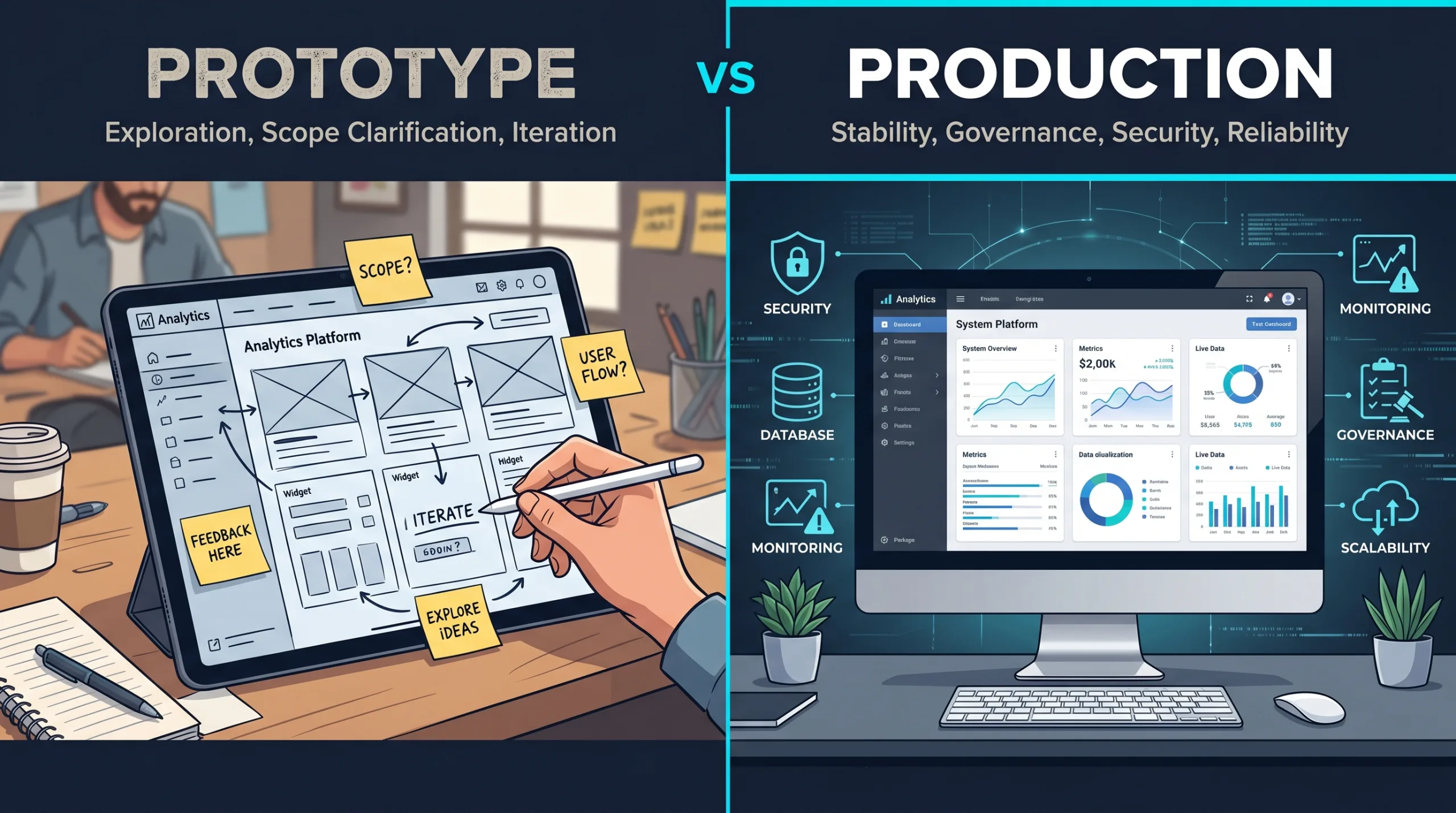
Same idea. Different job.
Looking like software and behaving like a reliable business system are different things. A working demo is not a production-ready system. A scoping prototype is not a pilot. A pilot is not production.
A prototype exists to help people discuss and validate ideas. It may use fake data, skip edge cases, ignore scalability, fake integrations, or bypass security – and that is fine, as long as everybody understands what it actually is.
A pilot touches real users in a controlled environment. That means defining who can access it, what data it uses, what happens when it fails, how support works, and how feedback gets captured.
Production is another level entirely. Now you are dealing with security, maintainability, monitoring, accessibility, backups, permissions, governance, performance, support ownership, and operational reliability.
| Stage | Purpose | Acceptable shortcuts | Required discipline |
|---|---|---|---|
| Prototype | Expose the real project hiding inside a vague request. | Fake data, half-working buttons, faked integrations, no security model, no scalability plan. | Clarity about what it is and is not. A decision at the end. |
| Pilot | Test with real users in a controlled environment. | Limited user base, narrow scope, simplified data, manual workarounds where needed. | Defined access, defined data, failure plan, support contact, feedback capture. |
| Production | Run the system the business depends on. | Very few. Shortcuts here become outages, breaches, or compliance issues. | Security, monitoring, accessibility, backups, permissions, governance, support, performance, ownership. |
// good fit Where Vibe Coding Helps Most
Vibe coding tends to work best when the problem is early, concrete, bounded, and still being explored.
Good examples include first-pass UI screens, landing page tests, intake forms, internal workflow mockups, dashboard concepts, admin panels, demo flows, proof-of-concept integrations, fake-door validation tests, and quick UX comparisons. These are situations where seeing something changes the quality of the conversation.
| Good fit | Why it helps | Watch out for |
|---|---|---|
| First-pass UI screens | Turns layout debates into something everyone can click. | Mistaking polish for product readiness. |
| Status / portal alternatives | Reveals whether the real need is a portal or just better updates. | Treating fake status data as the real source of truth. |
| Intake forms | Surfaces tension between sales, support, and operations early. | Wiring it to a real CRM or booking system without review. |
| Internal workflow mockups | Lets operators show, not tell, where the workflow breaks. | Quietly becoming a permanent “temporary” tool. |
| Dashboard concepts | Reveals whether the team needs charts or decisions. | Putting fake data in front of execs without labeling it clearly. |
| Internal AI drafting tools | Tests AI usefulness behind a human review step before it reaches customers. | Skipping the question of where the “approved answers” come from. |
| Proof-of-concept integrations | Validates whether two systems can actually meet in the middle. | Skipping error handling, rate limits, and edge cases. |
| Fake-door validation tests | Tells you if anyone actually wants the feature before you build it. | Misleading real customers about what is shipping today. |
// the loop How SMB Teams Can Use Vibe Coding Well
The teams getting real value from AI-assisted prototyping usually follow a pretty simple pattern. It is not a tool. It is a rhythm.
Define the question
Build the smallest artifact
Review with the right people
Capture what changed
Decide the next step
Run it again
// technical partner Where a Technical Partner Changes the Outcome
This is where the “DIY” interpretation of vibe coding breaks down.
Yes, the tools are more accessible. Yes, a nontechnical person can generate something that looks like software. That is real and worth paying attention to. But looking like software and behaving like a reliable business system are different things.
The work still needs judgment.
That is not prompt skill. That is product, engineering, and business judgment working together.
For SMBs, this is where a technical partner makes the process less risky. The goal is not to hand the business a tool and say, “Go build your app.” The goal is to help the business see the real project sooner.
// better scope What Better Scope Looks Like
Better scope is not a longer feature list. In fact, better scope is often shorter.
It may say:
This is not less ambitious. It is more precise. A vague big project is not safer than a clear small one. It is just harder to price, harder to build, harder to test, and easier to misunderstand.
Vibe coding helps when it creates enough visibility to make the first real version smaller and sharper. That is the kind of speed SMBs can actually use.
// the real deliverable The Real Deliverable Is Confidence
The rough prototype may get thrown away. That is fine.
If it helped the team decide what not to build, it worked. If it revealed that a “portal” was really a status workflow, it worked. If it showed that the dashboard needs fewer charts and more operational exceptions, it worked. If it proved that the AI assistant needs approved source material before it needs a chat bubble, it worked.
The deliverable is not the code. The deliverable is a clearer path.
At Reston Tech Wiz, this is the practical role vibe coding plays in serious SMB work. It can make ideas visible early enough to test the assumption, expose the hidden workflow, and shape a better first release. Then the real work can be scoped properly: architecture, UX, data, permissions, integrations, security, testing, deployment, and support.
Vibe coding is not the service. The service is knowing what the prototype means – and just as important, knowing what it does not.
Use vibe coding to get to the first honest artifact faster. Then use engineering judgment to decide what deserves to become a real system.
editorial thesis – rtw 2026
| Source | Used for |
|---|---|
| U.S. Census Bureau – AI Use at U.S. Businesses (May 2026) | Current U.S. business AI adoption ranges and near-term expected adoption. |
| UK DSIT – AI Adoption Research (2026) | UK business AI adoption (present but uneven; NLP / text generation common among adopters). |
| Eurostat – Digitalisation in Europe 2025 | EU enterprise AI adoption growth and large-business vs. SME context. |
| Stack Overflow – 2025 Developer Survey: AI | Developer trust and frustration with AI-generated output. |
| METR – Early-2025 AI Developer Productivity Study | Counterweight to universal productivity claims, especially mature repos and experienced developers. |
| arXiv / GitHub-Microsoft – Copilot Productivity Study (2023) | Controlled-study example: Copilot users completed a bounded task 55.8% faster. |
| Figma – 2025 AI Report | Product-builder context: AI improves efficiency, teams still rely on iteration and human judgment. |
