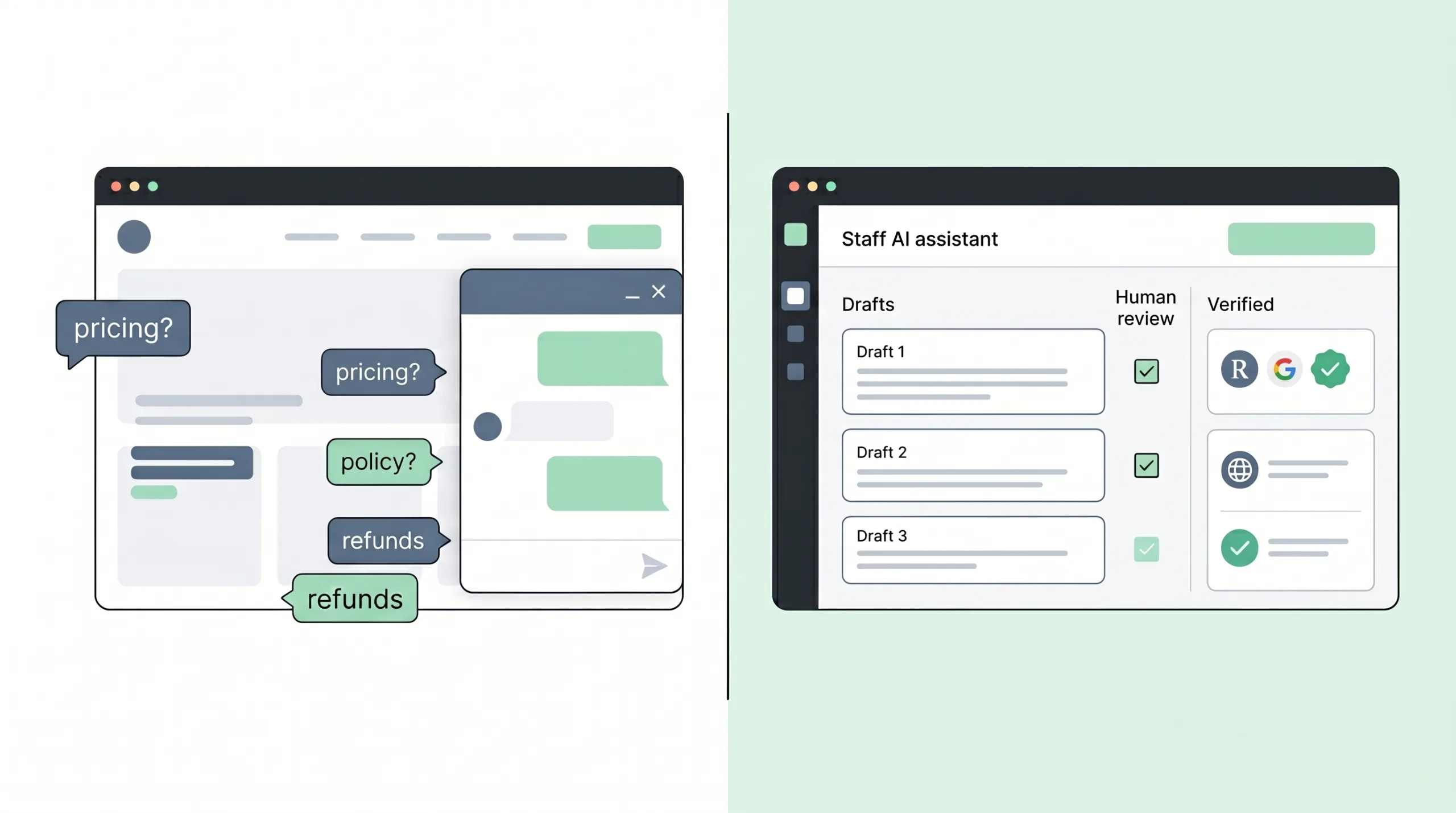
There is a very specific moment that happens in AI conversations now.
Someone says, “We should add an AI assistant to the website.”
Everyone nods, because it sounds modern, useful, and just vague enough to survive the meeting.
Then the idea quietly becomes a chatbot.
A public chatbot.
On the homepage.
Answering customer questions.
In the company’s voice.
Possibly about pricing, policies, services, deadlines, refunds, availability, warranties, eligibility, account details, and all the tiny operational exceptions that normally require a person named Linda who has worked there since 2014 and knows which promises not to make on a Thursday.
This is where the conversation should slow down.
Not because AI assistants are a bad idea. They can be very useful. Not because every public chatbot is doomed. Some are well-scoped, well-tested, and genuinely helpful. And not because businesses should sit politely in the corner while technology changes around them.
The issue is simpler.
A public chatbot is often treated as the first AI feature because it is the easiest to imagine. It may not be the safest or most valuable place to begin.
For many businesses, the better first AI feature starts behind the counter.
It helps staff draft better replies. It searches approved knowledge. It triages inbound requests. It prepares sales notes. It summarizes long threads. It flags missing information. It helps a human move faster while the human still decides what gets sent, promised, quoted, escalated, or recorded.
That is not a smaller ambition.
That is a better learning surface.
Public AI should be earned, not assumed.
ai feature rule – rtw 2026
// the temptation The Homepage Chatbot Is the Shiny Door
A chatbot has excellent demo energy.
You type a question. It answers. The future appears. Someone says, “Imagine this on the website,” and now the business is one enthusiastic afternoon away from letting a probabilistic text machine represent the brand at 2:13 a.m.
This is why vibe coding makes the AI feature conversation both more exciting and more dangerous.
With AI-assisted tools, a team can create a rough assistant interface quickly. A prototype can show a chat window, a knowledge panel, suggested replies, customer inputs, and maybe even a fake booking or quoting flow. That speed is useful. As the first two articles in this series argued, the rough version can arrive early enough to be challenged, and that is where the value begins. A prototype is not the system; it is a way to make the hidden work visible.
But AI assistants have a different kind of hidden work.
A public chatbot is not just a screen. It is a promise machine.
It can promise something explicitly: “Yes, you qualify.”
It can promise something accidentally: “We can usually complete this by Friday.”
It can promise something by omission: “Just upload your document here,” without explaining what happens to it.
It can promise something through confidence: a polished answer that sounds like the business has approved every word, even when the answer was generated from stale policy text, missing context, or a customer prompt that quietly moved the bot outside its lane.
This is why “Can we add AI chat?” is rarely the real question.
The better question is:
Where can AI help the business while the business still controls the answer?
That question usually points inside first.
// evidence AI Helps When It Supports the Work, Not When It Performs Confidence Theater
There is real evidence that AI assistance can help service teams.
In the widely cited “Generative AI at Work” study, researchers studied the staggered introduction of a generative AI conversational assistant across more than 5,000 customer-support agents. Access to the tool increased productivity, measured by issues resolved per hour, by about 14% on average, with larger gains for newer and lower-skilled workers. The interesting part is not only “AI made people faster.” The tool helped workers by guiding conversations and spreading some of the tacit knowledge that stronger agents already had. NBER
That is a staff-facing use case.
AI assisted the person doing the work. It did not simply replace the support function with a public, unsupervised answer box and a prayer candle.
McKinsey makes a similar point in its contact-center analysis: customer care is moving toward a world where AI and human assistants work side by side, and the practical path is likely a hybrid approach that uses the strengths of both. McKinsey
That hybrid idea matters for businesses that do not have giant AI teams, full-time model evaluators, or an internal department whose entire job is to ask, “What if the bot becomes weird?”
AI can help.
But “help” is not the same as “speak publicly on behalf of the company without supervision.”
There is also a user-experience warning here. Nielsen Norman Group has argued that AI chat is not always the right interface, especially when leaders feel pressure to add AI before the user need is clear. Nielsen Norman Group
That should be pinned near every AI brainstorming session.
Sometimes the user does not need a chatbot. Sometimes the customer needs a clearer service page, a better form, a faster callback, a smarter intake flow, or a staff member who can answer accurately because the internal knowledge is finally searchable.
The glamorous version is “AI talks to customers.”
The useful first version is often “AI helps the team not copy, paste, guess, and hunt through twelve documents while the customer waits.”
The homepage is not the safest place to learn what your AI does not know.
deployment rule – rtw 2026
// reality check The Public Bot Has Already Given Us Enough Warnings
The risk is not theoretical.
In 2024, Air Canada was ordered to compensate a passenger after its chatbot gave inaccurate information about bereavement fare refunds. The British Columbia Civil Resolution Tribunal rejected Air Canada’s argument that the chatbot was a separate legal entity responsible for its own actions; the chatbot was part of Air Canada’s website, and the company remained responsible for the information provided there. McCarthy Tétrault, ABA Business Law Today
That case gets cited a lot because it is tidy in a slightly painful way.
A customer asked. The bot answered. The answer was wrong. The company still owned the answer.
The lesson is not “never build a chatbot.”
The lesson is that a chatbot on your website is not an intern who wandered in from the internet. It is part of your customer experience. If it gives information, customers may reasonably treat that information as yours.
Then there was the DPD incident, also in 2024. DPD disabled part of its AI-powered online chatbot after a customer was able to make it swear, call itself useless, and criticize the company. According to DPD, the behavior followed a system update, and the AI element was disabled while it was being updated. The Guardian
That one is less about legal liability and more about brand risk, user frustration, and the unpleasant discovery that “it was just a chatbot” is not comforting once screenshots are moving faster than your PR team.
Public AI has a social surface.
People will test it. Customers will misunderstand it. Competitors may poke at it. Bored users may try to make it say something ridiculous. Angry users may try harder. And even ordinary users may ask normal questions in ways your prototype did not expect because customers have a deep commitment to not following your ideal test script.
This is why the first serious AI feature often belongs behind the counter.
Behind the counter, staff can see the draft before it becomes a promise.
Behind the counter, incorrect answers can be caught before they become screenshots.
Behind the counter, the company can learn which sources are reliable, which questions are common, which policies are unclear, and which requests should never be answered automatically.
Behind the counter, AI can be helpful while still being supervised by people who understand the business.
// better first move Staff-Facing AI Is Not Less Ambitious
Staff-facing AI sounds modest until you look at where time actually disappears.
Support teams rewrite the same answer ten times a week.
Sales reps respond to inbound leads with different levels of speed, detail, and quality.
Operations staff search old emails to remember the answer to a policy question.
A coordinator reads a long customer message and manually decides whether it is urgent, missing information, in the wrong category, or secretly three requests wearing one coat.
A manager wants a summary of what changed in a project thread before approving next steps.
A new employee asks where the warranty language lives, and everyone points vaguely toward “the drive.”
AI can help with that.
Not by replacing judgment.
By reducing the part of the work that is repetitive, slow, fragmented, or dependent on memory.
For many businesses, that is where the first return is.
| AI feature shape | Public chatbot first | Staff-facing assistant first |
|---|---|---|
| Who sees the answer | Customer immediately | Employee first |
| Main risk | Wrong promise becomes public | Wrong draft can be corrected |
| Best use | Narrow, tested, low-risk questions | Drafting, search, triage, prep, summaries |
| Knowledge needs | Very clean, approved, current | Still needs approved sources, but can reveal gaps safely |
| Human review | Often after the problem | Before the answer leaves the building |
| Good first milestone | Limited FAQ or guided support flow | Internal response assistant or intake helper |
Draft before send
Approved knowledge
Human review
A public chatbot can still be part of the roadmap.
But it should be earned by proving that the knowledge is clean, the answer boundaries are clear, the escalation paths work, and the business knows what the AI is allowed to see, say, and do.
That last sentence is the whole game.
// example 01 Customer Support: Let AI Draft, Let Staff Decide
Imagine a service company that gets the same ten questions every day.
Do you service my area?
What is included in the maintenance plan?
Can I reschedule?
What happens if I miss the appointment window?
Do you work with commercial properties?
Can I send photos before booking?
The tempting version is a public chatbot that answers all of this directly.
Maybe that becomes appropriate later.
A safer first version is an internal answer assistant.
Staff paste or receive the customer question. The assistant searches approved FAQ, policy pages, service notes, and maybe internal scripts. It drafts a response. It shows which source it used. It flags uncertainty. It suggests when to escalate. A staff member edits, approves, and sends.
This is less flashy than a public chatbot.
It is also much more likely to survive contact with reality.
| Assistant capability | What it helps with | What still needs a human |
|---|---|---|
| Draft reply from approved FAQ | Faster, more consistent answers | Tone, context, exceptions |
| Show source snippets | Less guessing and fewer stale answers | Confirm source is still current |
| Flag missing info | Better intake before follow-up | Decide whether to ask or call |
| Suggest escalation | Keeps sensitive cases out of automation | Final routing and ownership |
| Summarize customer thread | Saves staff reading time | Judgment about next action |
The key is that the AI is not being asked to be the company.
It is being asked to assist the person who represents the company.
That distinction sounds small until the assistant gets something wrong. Then it becomes the entire difference between “good catch” and “why is this on LinkedIn?”
// example 02 Sales: Faster Lead Response Without Letting AI Close Its Eyes and Hit Send
Sales teams often do not need AI to “sell.”
They need help getting from messy inbound request to useful next step.
A lead comes in through the website:
“We’re looking for help modernizing our client portal and maybe adding AI. We have a CRM but it’s kind of messy. Can someone call me?”
A public AI sales bot might try to qualify, recommend services, maybe even push a booking link.
That can be fine for simple, bounded scenarios. But for higher-value work, the first AI feature should probably help the sales team behind the scenes.
A staff-facing sales prep assistant can:
It should not automatically promise timeline, price, fit, discount, availability, technical feasibility, or “yes, we can absolutely do that” just because the lead used enough exciting nouns.
Exciting nouns are not a scope.
They are confetti.
| Lead detail | AI can suggest | Human should decide |
|---|---|---|
| “Need AI assistant” | Possible knowledge search, support draft, intake triage | Whether AI is appropriate at all |
| “CRM is messy” | Ask about source of truth and data quality | Whether project starts with cleanup |
| “Need it fast” | Draft expectation-setting language | Real timeline and staffing |
| “What would it cost?” | Ask scoping questions first | Price range or proposal path |
| “Can you call me?” | Suggest next-step email | Who follows up and when |
This kind of assistant can be vibe-coded as a prototype quickly.
A rough screen might have a lead input, AI summary, missing-info checklist, suggested reply, source links, and “requires human review” status. The prototype does not have to integrate with the CRM on day one. It needs to expose the workflow.
Who reviews the draft?
Which service categories are real?
What words should never be used before discovery?
Where should the final response be logged?
What happens when the AI classifies a lead incorrectly?
Now the team is not debating “should we use AI in sales?” in the abstract.
They are looking at the work.
And the work, as usual, has opinions.
// example 03 Nuanced Businesses Need Guardrails Before Personality
Some businesses live in nuance.
Clinics. Insurance agencies. Financial services. Legal-adjacent services. Contractors dealing with warranties. Home-services teams with emergency policies. Professional firms that cannot casually answer “what should I do?” as if every user is asking whether to paint the kitchen blue.
In these environments, the problem is not only whether the AI answer is friendly.
The problem is whether the AI answer crosses a line.
It may give medical-adjacent advice when it should route to a provider.
It may interpret coverage when it should explain next steps.
It may imply legal guidance when it should offer general information.
It may quote a price without knowing the exclusions.
It may say a job is covered under warranty when photos, dates, location, and service history have not been reviewed.
It may answer a customer-specific question using general policy text and forget that the customer has an exception in their account.
This is not the bot being dramatic.
This is the business having real rules.
A staff-facing assistant can still be useful here, but the first version should be humble.
It can help staff find the relevant policy. It can draft a response with disclaimers. It can say, “This appears to require review.” It can flag sensitive categories. It can refuse to draft certain kinds of answers without a human specialist.
| Business context | Safer AI starting point | Avoid at first |
|---|---|---|
| Clinic or wellness practice | Internal policy search and appointment prep | Public diagnosis or treatment advice |
| Insurance agency | Coverage document lookup and draft follow-up | Binding coverage interpretation |
| Legal-adjacent service | Intake summary and document checklist | Legal conclusions or promises |
| Home services | Warranty-status draft and photo-intake triage | Automatic approval or denial |
| Finance or billing | Explanation draft from approved templates | Final decisions on disputes or adjustments |
The AI can help staff move faster through the maze.
It should not be handed a flashlight, a signature stamp, and access to the front door on the first day.

The assistant is defined by what it can see, say, and do.
// the three questions What Can It See, What Can It Say, What Can It Do?
AI risk can sound technical very quickly.
Prompt injection. Sensitive information disclosure. Excessive agency. Misinformation. Retrieval weakness. Output handling. Model behavior. System prompt leakage.
These are real issues, and the technical team should take them seriously. OWASP’s 2025 Top 10 for LLM Applications highlights risks including prompt injection, sensitive information disclosure, excessive agency, and misinformation. OWASP GenAI Security Project
But for business leaders, the first translation can be very simple.
| Plain question | What it means | Example failure |
|---|---|---|
| What can it see? | What data, documents, accounts, tickets, emails, or files can the AI access? | It exposes customer data, internal notes, pricing rules, or sensitive documents. |
| What can it say? | What answers, claims, recommendations, or promises can the AI generate? | It gives confident but false policy information or makes a promise the company cannot honor. |
| What can it do? | What actions can the AI trigger in other systems? | It sends emails, updates records, issues refunds, changes statuses, or books appointments without proper approval. |
That is the management version.
The technical version matters too.
OWASP describes sensitive information disclosure as exposure of data such as personally identifiable information, financial details, health records, confidential business data, credentials, or legal documents. OWASP LLM02
OWASP describes excessive agency as risk created when LLM-based systems can call functions or interact with other systems through tools, plugins, extensions, or similar mechanisms. OWASP LLM06
OWASP describes misinformation as false or misleading information that appears credible and can create reputational damage, legal liability, or other business consequences. OWASP LLM09
Put less formally:
Do not give the intern the keys, the credit card, the refund button, and the authority to interpret policy because it wrote a confident paragraph.
Especially if the intern is a language model with no childhood, no liability insurance, and no memory of last Tuesday unless you engineered one.
The AI feature is not defined by the chat window. It is defined by its permissions.
architecture rule – rtw 2026
// approved knowledge RAG Is Not Fairy Dust
Many AI assistant ideas quickly arrive at the same technical phrase:
“We’ll connect it to our documents.”
That can be a good idea. It is also where a lot of optimism goes to put on a blazer.
Retrieval-augmented generation, often called RAG, can help an AI system answer using a defined set of documents instead of relying only on the model’s general training. In plain English: the assistant searches your approved material, pulls relevant snippets, and uses them to draft an answer.
Useful.
Not magical.
If the documents are outdated, the assistant can retrieve outdated information.
If the policies contradict each other, the assistant can sound confident while standing in the middle of a policy fight.
If permissions are sloppy, the assistant may retrieve information a staff member should not see.
If the source library includes draft notes, old pricing, deprecated service descriptions, or a PDF from 2019 named final_final_REAL.pdf, the AI is not going to become wise through vibes.
It will use what you gave it.
This is why a staff-facing first version is so useful.
The assistant can reveal the knowledge problem before the company exposes the knowledge problem to customers.
| Question | Why it matters |
|---|---|
| Which documents are approved sources? | The AI should not treat every file as policy. |
| Who owns each source? | Someone must update it when reality changes. |
| Which sources are stale? | Old pricing and old policies are not harmless. |
| Which answers need citations? | Staff should see why the assistant said what it said. |
| Which topics require escalation? | Some questions should never be answered automatically. |
| Which data is customer-specific? | General policy is not the same as account truth. |
The first AI prototype may reveal that the business does not have an AI problem.
It has a knowledge-management problem with better lighting.
That is still progress.
// human review Human-in-the-Loop Is Not a Decorative Checkbox
A lot of AI plans include the phrase “human-in-the-loop.”
Good.
Now comes the annoying question:
Which human?
At what moment?
With what information?
With authority to change the answer?
And enough time to actually review it?
A human who clicks “approve” on twenty AI drafts per minute is not a loop. That is a rubber stamp with a login.
Human review only works when the interface supports review.
A staff-facing AI assistant should show the draft, the sources, the confidence signals, the missing information, the risk category, and the next action. It should make it easy to edit. It should make it easy to reject. It should log what was sent. It should let the team improve the source material when the assistant keeps struggling.
If review is harder than writing from scratch, staff will bypass it.
Then the AI feature becomes one more tool everyone technically has and nobody quietly trusts.
| Stage | What AI does | Human role | Risk level |
|---|---|---|---|
| Draft | Writes a suggested response | Edit and approve | Lower |
| Search | Finds relevant source material | Choose what applies | Lower |
| Triage | Categorizes and flags urgency | Confirm routing | Medium |
| Recommend | Suggests next action | Decide and record | Medium |
| Act with approval | Prepares action in a system | Approve before execution | Higher |
| Act autonomously | Takes action without review | Monitor after the fact | Highest |
Most businesses should start at the top of the ladder.
Draft. Search. Triage.
Do not jump straight to autonomous action because the demo made it look calm.
Demos are always calm.
Production waits until everyone is on vacation and then asks whether your monitoring works.
// where vibe coding helps The Prototype Should Expose the Operating Model
So where does vibe coding fit?
It is very useful for exploring the shape of an AI assistant before the team commits to the wrong one.
A rough prototype can show:
This is not about making a production AI system in a weekend.
It is about seeing the workflow.
For example, a vibe-coded support assistant prototype might include three panels:
That screen immediately creates better questions.
Who decides which FAQ is approved?
What happens if the source is wrong?
Can staff see customer account data here?
Does this connect to email, helpdesk, CRM, or nothing yet?
Should the assistant store the conversation?
Can managers review AI-assisted replies?
Does the customer know AI helped draft the answer?
Which topics must route to a person without drafting anything?
Now the AI idea is no longer floating above the business like a shiny balloon.
It is sitting on the desk, touching the actual workflow, being mildly inconvenient in useful ways.
That is exactly what a good prototype should do.
A useful AI prototype does not prove the bot is smart. It proves where the business needs rules.
prototype rule – rtw 2026
// first use cases Five AI Features Worth Prototyping Before a Public Chatbot
The best first AI feature is usually narrow, internal, and connected to a repeated pain.
Not “AI for the company.”
Please do not put that on a roadmap. It sounds like a board game nobody wins.
Start with a place where people already copy, paste, search, summarize, classify, or rewrite.
Internal answer assistant
Question: Can staff answer common customer questions faster using approved sources?
Good for: support, service teams, account management, reception, scheduling.
Watch out for: stale FAQ, policy conflicts, missing escalation rules.
Inbound lead triage
Question: Can AI help classify leads, identify missing info, and draft better first replies?
Good for: sales teams, agencies, home services, professional services.
Watch out for: overpromising fit, timeline, pricing, or technical feasibility.
Knowledge search for staff
Question: Can employees find the right policy, template, or procedure without asking three people?
Good for: operations, onboarding, support, compliance-heavy teams.
Watch out for: treating old documents as current truth.
Case or ticket summary
Question: Can AI summarize long threads so staff can understand status faster?
Good for: project teams, customer service, operations, finance disputes.
Watch out for: missed details, emotional nuance, or legally relevant facts.
Admin copilot
Question: Can AI help prepare routine internal updates, checklists, or follow-up drafts?
Good for: recurring reports, onboarding, approvals, vendor communication.
Watch out for: turning drafts into unsupervised decisions.
These are not glamorous in the keynote sense.
They are glamorous in the “people stop wasting Tuesday afternoon searching for the latest template” sense.
That is the better kind of glamour. It has fewer laser beams and more margin.
// when public makes sense When a Public AI Assistant May Be Ready
None of this means the public chatbot is forbidden.
It means the public chatbot should arrive with evidence.
A customer-facing AI assistant may make sense when the question space is narrow, the knowledge base is current, the stakes are low enough, the escalation paths are clear, and the business has tested the assistant internally first.
A public assistant for “What are your opening hours?” is not the same animal as a public assistant for “Am I covered?”
A public assistant for “Which documents do I need before my appointment?” is not the same as “What should I do about these symptoms?”
A public assistant for “Track my request status” is not the same as “Change my account details and apply a discount.”
Different animals.
Different fences.
| Readiness question | Green signal | Red flag |
|---|---|---|
| Is the topic narrow? | The assistant handles defined questions only. | It is expected to answer “anything.” |
| Are sources approved? | Every answer is grounded in current material. | It searches messy folders or old docs. |
| Is escalation clear? | The bot knows when to hand off. | It keeps talking through sensitive cases. |
| Are promises constrained? | It cannot quote, approve, deny, or guarantee. | It speaks as if every answer is binding. |
| Is data access limited? | It sees only what it needs. | It has broad access because “maybe useful.” |
| Has it been tested? | Staff used it first and logged failures. | It went public after the demo looked good. |
If those answers are not ready, the business is not behind.
It is being sensible.
The most expensive AI mistakes often start as pressure to look advanced before the operational model is real.
Looking advanced is not the same as being useful.
And it is definitely not the same as being safe.
// governance without theater Use NIST as a Reminder, Not a Doorstop
AI governance can sound like something that arrives in a 90-page PDF, ruins everyone’s mood, and then lives forever in a folder called Compliance.
That is not the goal.
The point is to make AI systems trustworthy enough for the work they are asked to do.
NIST’s AI Risk Management Framework is intended to help organizations incorporate trustworthiness considerations into the design, development, use, and evaluation of AI systems. NIST’s Generative AI Profile builds on that framework and is meant to help organizations identify unique generative AI risks and actions that align with their goals and priorities. NIST AI RMF, NIST Generative AI Profile
For a business building its first AI assistant, that does not have to become a ceremony.
It can start with practical guardrails:
That is not bureaucracy.
That is not letting the chatbot become the most confident employee in the building simply because it types quickly.
// the agency role Where a Technical Partner Changes the Outcome
The easy version of the AI assistant conversation is, “Can we build a chatbot?”
The better version is, “Which part of the work should AI assist first, and what needs to be true before customers see it?”
That is where a technical partner matters.
A good AI feature is not just a prompt box. It is a small system with knowledge boundaries, data rules, permissions, review paths, logs, escalation, testing, UX, and maintenance.
The first screen is rarely the risk.
The risk is what the screen can access, generate, trigger, or imply.
At Reston Tech Wiz, the practical value of a vibe-coded AI prototype is not that it creates a magical assistant instantly. It is that it lets the business see the assistant’s job before overbuilding it.
Maybe the first release is not a public chatbot.
Maybe it is an internal response assistant.
Maybe it is a sales prep tool.
Maybe it is staff knowledge search.
Maybe it is a triage screen that helps route requests faster.
Maybe the public chatbot becomes phase two after the business proves the knowledge, review, and escalation model works.
Or maybe the business discovers that customers do not need a bot at all. They need a better intake form, clearer service pages, smarter email automation, or a staff tool that helps the team respond with more consistency.
That is not a retreat from AI.
That is using AI where it can help without handing it the microphone before soundcheck.
// decision Start Where the Business Can Learn Safely
AI assistants are coming into everyday business workflows.
That part is not especially mysterious anymore.
The decision is where to put them first.
A public chatbot may be tempting because it is visible. It makes the website feel current. It gives the business a “we are using AI” artifact. It photographs well in a meeting.
But the most useful first AI feature may be quieter.
A draft that staff reviews.
A knowledge answer with sources.
A lead summary that saves ten minutes.
A triage screen that catches missing information.
A support helper that makes common answers more consistent.
A sales prep assistant that keeps the first reply from being a blank page with anxiety.
Behind the counter is where the business can learn what the AI gets right, where it struggles, which documents are messy, which policies are unclear, which promises are risky, and which workflows deserve a real build.
That is the right place to start.
Not because public AI is impossible.
Because public AI should be earned.
Start where the team can learn safely: behind the counter, with approved sources, human review, and a very clear understanding of what the assistant can see, say, and do.
// next step Next Step
Have an AI assistant idea that currently sounds like “we should add a chatbot”? Reston Tech Wiz can help turn it into a safer first prototype: internal draft assistant, knowledge search, intake triage, sales prep, or a public-facing roadmap with the right guardrails before launch.
| Source | Used for |
|---|---|
| Reston Tech Wiz — Vibe Coding Beyond the Demo | Series framing: a rough AI-generated artifact can make ideas visible earlier, but the demo is not the system. |
| Reston Tech Wiz — Vibe Coding and SMB Scope | EP2 framing: an “AI assistant” may really be a knowledge-quality, workflow, or scoping problem; this EP expands that idea. |
| NBER — Generative AI at Work | Evidence that generative AI assistance can improve customer-support productivity when it supports agents rather than simply replacing judgment. |
| McKinsey — The contact center crossroads | Hybrid framing: AI and human assistants working side by side in customer care. |
| Nielsen Norman Group — AI Chat Is Not Always the Answer | UX warning against adding chat interfaces just because AI is available. |
| McCarthy Tétrault / ABA Business Law Today — Moffatt v. Air Canada | Public chatbot accountability example: companies can remain responsible for misinformation delivered by website chatbots. and |
| The Guardian — DPD AI chatbot incident | Brand and customer-experience risk example after DPD disabled part of its AI chatbot. |
| NIST — AI Risk Management Framework / Generative AI Profile | Trustworthiness and lifecycle framing for AI design, development, use, and evaluation. and |
| OWASP GenAI Security Project — Top 10 for LLM Applications 2025 | Management translation of LLM risks: prompt injection, sensitive information disclosure, excessive agency, misinformation, and related security concerns. |
| OWASP — LLM02 Sensitive Information Disclosure | Data-boundary risk: PII, financial details, health records, confidential business data, credentials, and legal documents. |
| OWASP — LLM06 Excessive Agency | Action-boundary risk: AI systems that can call tools, plugins, functions, or other systems. |
| OWASP — LLM09 Misinformation | Answer-boundary risk: false or misleading information that appears credible. |
